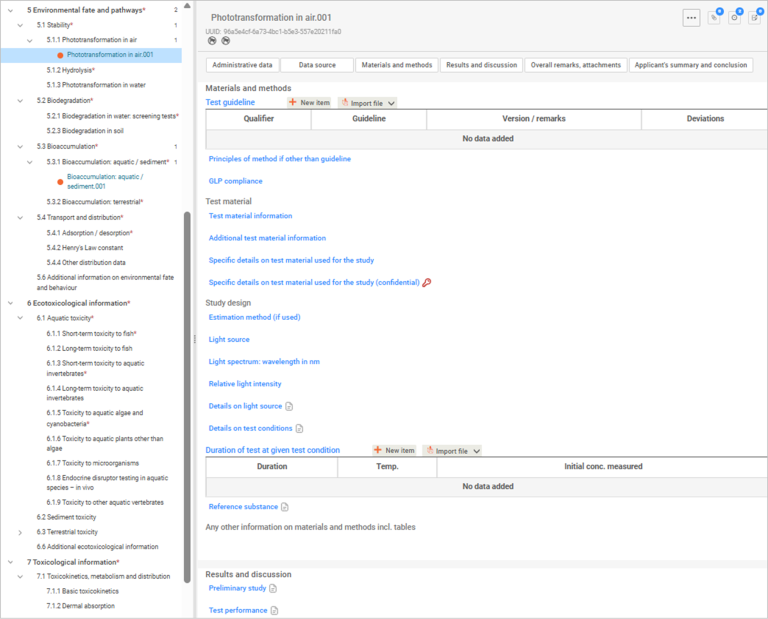
Sections 5, 6 and 7 – Environmental fate and pathways, Ecotoxicological and Toxicological information
Although these sections address different endpoints, the IUCLID document structure and fields are largely the same across Sections 5, 6 and 7. This guidance applies to all 3 sections unless we state otherwise.
What each section covers
- Section 5 – Environmental fate and pathways: records studies and information on how the substance behaves in the environment (for example, degradation, distribution and transport).
- Section 6 – Ecotoxicological information: records studies on the effects of the substance on environmental organisms (for example, aquatic and terrestrial species).
- Section 7 – Toxicological information: records studies and information on the effects of the substance on human health.
Information requirements and waivers
Provide all required endpoint information for your application type, as set out in the general assessment certificate application guide.
If you do not have the required information for an endpoint, you must request an information waiver and provide appropriate justification.
See our information waivers guidance
Important: Do not select ‘experimental study planned’ or ‘experimental study planned (based on read across)’. AICIS does not accept these options.
General guidance for Sections 5, 6 and 7
When completing documents in Sections 5, 6 and 7:
- refer to our list of required endpoints based on your application type – see our general assessment certificate application guide
- include any other relevant information you have
- use the IUCLID help text complete each endpoint field.
Endpoint study records
IUCLID captures data at the endpoint study record level in each section.
- Navigate through the endpoint hierarchy until you see a plus (+) symbol.
- Select the plus symbol to add a new endpoint study record (for example, Short-term toxicity to fish).
- You can add multiple endpoint study records for the same endpoint. IUCLID automatically assigns unique document numbers. Each record has its own Universally Unique Identifier (UUID).
- Make sure that the data you provide in IUCLID documents match the actual study report.
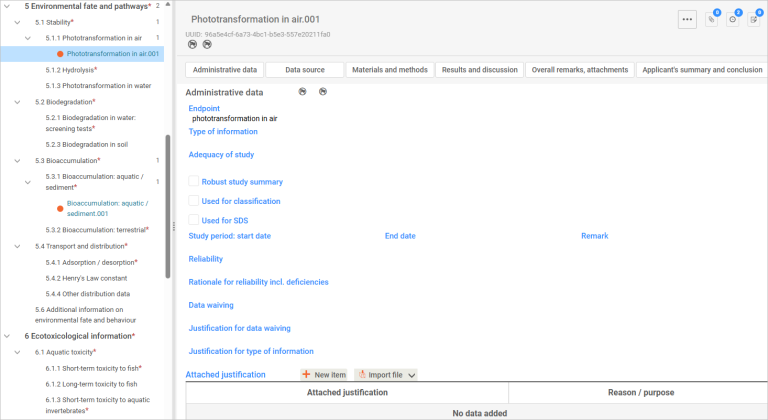
Administrative data
Use the Administrative data section to manage confidentiality, regulatory use and study context.
- You can flag CBI and restrict regulatory use (by jurisdiction).
- Flagging through Administrative data automatically flags the whole section.
- You can enter data into an endpoint study record through both structured (e.g., pick list and repeatable tables) and unstructured (e.g., plain and free text) fields.
Some fields appear or disappear depending on your earlier selections.
For example, if you selected Experimental study under Type of information, the option to waive data will not be available.
If you selected an incorrect state or form for a substance (for example, for a nanoform), nanoform-related fields may not appear.
Key Administrative data fields
Endpoint – select the type of endpoint from a pick list. If there is only one type, the name of the endpoint record is the only choice. Provide any comments about the endpoint under Remarks, if needed.
Types of information – your selection determines which fields appear for you to complete.
Adequacy of study – select the description of how the endpoint study meets the information requirements from the pick list (see table below) for the chemical under your assessment certificate application.
| Study type | Explanation |
|---|---|
| Key study | A study that is relevant, adequate, and reliable. We expect that they will relate to a robust study summary included with the certificate application. If there is more than one key study, then use the study with the highest hazard profile. Make sure you also describe reasons why you chose the study as the key study. Include this in the Justification for type of information field. |
| Supporting study | A study that provides extra information supporting the conclusions of the key study. |
| Weight of evidence | Select this option where your submission relies on multiple studies for the same endpoint. This approach suggests that there is no single relevant, adequate, or reliable study available to reach a conclusion and that multiple studies are needed to make a conclusion about the particular property of the chemical. Include reasons describing why you chose a weight of evidence approach under Justification for type of information. |
| Disregarded due to major methodological deficiencies | Select this option where a study result shows a higher hazard profile than a key study result, but the methodology or documentation is unreliable, inadequate or irrelevant. Include reasons why this study was disregarded under Justification for type of information. |
| Other information | Select this option when information is available for the endpoint, but it does not meet the criteria for classification as disregarded due to methodological deficiencies. |
Use the help text for guidance for other fields under Administrative data.
Data waiving – select the reason for waiving study data. Provide justification under Justification for data waiving.
Justification for type of information – justify the type of information for the endpoint study record. You can select from existing templates for most types of information that is not an experimental study.
Attach justification – you can also attach files for your justification(s) through repeatable tables.
Cross reference – link to related information already stored elsewhere in the dataset so it doesn’t need to be uploaded again.
Select New item to use the repeatable tables. Set the values by filling in the pop-up fields – this allows you to select the stored reference(s).
Data source – this is the literature reference for this endpoint study record.
You can create this through Literature reference under Inventory manager. Or you can create the reference on the page in the pop-up window. Select Create for more than one literature reference.
Data access and Data protection claimed – required information if you are seeking to protect CBI.
Materials and methods
Use the help text to complete all fields. Key fields include:
- Test guideline – This is a critical field as it identifies the methodology used to generate the data. Recording the test guideline allows assessors to evaluate the reliability, comparability, and regulatory acceptability of the study.
- Repeatable tables – use these to include one or more applicable guidelines.
- OECD test guidelines – You will find it easier to fill in documents using studies conducted using OECD test guidelines, as AICIS working contexts follow OECD harmonised templates.
Principles of method if other than guideline – you can use the available templates for QSARs and for a non-guideline study.
You can also indicate GLP compliance as indicated in the study.
Test material information – select the appropriate test material from the pop-up list. You can only select one test material. If you have not yet created the test material reference, select Create.
Specific details on test material used for the study – provide as many details as possible on the test material.
Specific details on test material used for the study (confidential) – details that are confidential are provided in this field.
Fill in all the fields under materials and methods using the help text to guide you.
Any other information on materials and methods including tables – you can include detailed text as well as tables or other structured information where needed.
Results and discussion
Section-specific differences
Section 6 – Ecotoxicological information: Use Effect concentrations to report results.
Section 7 – Toxicological information: Use Effect levels to report results.
Apart from this difference, complete the remaining fields in the same way.
Completing results
Effect concentrations
Flag key results by selecting Key result. Use the templates to provide details on the results (test substance, positive control and negative control).
Reported statistics and error estimates – provide these in the text field.
Sublethal observations / clinical signs – record these observations and include any relevant details.
Overall remarks
This field is optional. Use it to provide more context or clarify study details.
Attachments
You must attach background material under the appropriate table, such as:
- the full study report for experimental data
- for analogue approaches, full articles or reports generated from appropriate computational models (for example, Quantitative Structure-Activity Relationship (QSAR) data).
We do not publish study reports you provide us.
Applicant’s summary and conclusion
You can:
- indicate whether validity criteria in the test guideline were met and explain why under Remarks
- provide conclusions and an executive summary of the results.