AICIS Business Services and all searchable databases, including Inventory and assessments, will be unavailable at 6–11pm (AEST) on Friday 19 June.

Confidential business information in IUCLID

IUCLID allows you to flag certain information as confidential business information (CBI). This helps protect commercially sensitive information while still allowing AICIS to assess your application. 

How AICIS handles confidential information is governed by our assessment certificate confidentiality and publication requirements. These determine what information can be treated as confidential and what can be published.

Learn more about confidentiality in assessment certificate applications

How CBI works in IUCLID

You can flag confidential information at different levels, depending on the field or document:

  • individual fields (where CBI is permitted)
  • entire documents
  • regulatory use (by jurisdiction)

Not all fields allow CBI flagging. You must follow the guidance in each section to determine where CBI can be applied.


How to flag CBI

Where CBI flagging is available:

  • select the CBI or regulatory use flags at the top left of the document or field
  • complete any required justification. Make sure your justification aligns with our confidentiality requirements for assessment certificate applications.

You must clearly explain why the information is confidential. We may request more information if the justification is not sufficient. Adding regulatory use restriction allows you to specify how the information may be used across jurisdictions. For example, this may apply where data is only authorised for use in a particular regulatory context or is subject to access or ownership limitations.
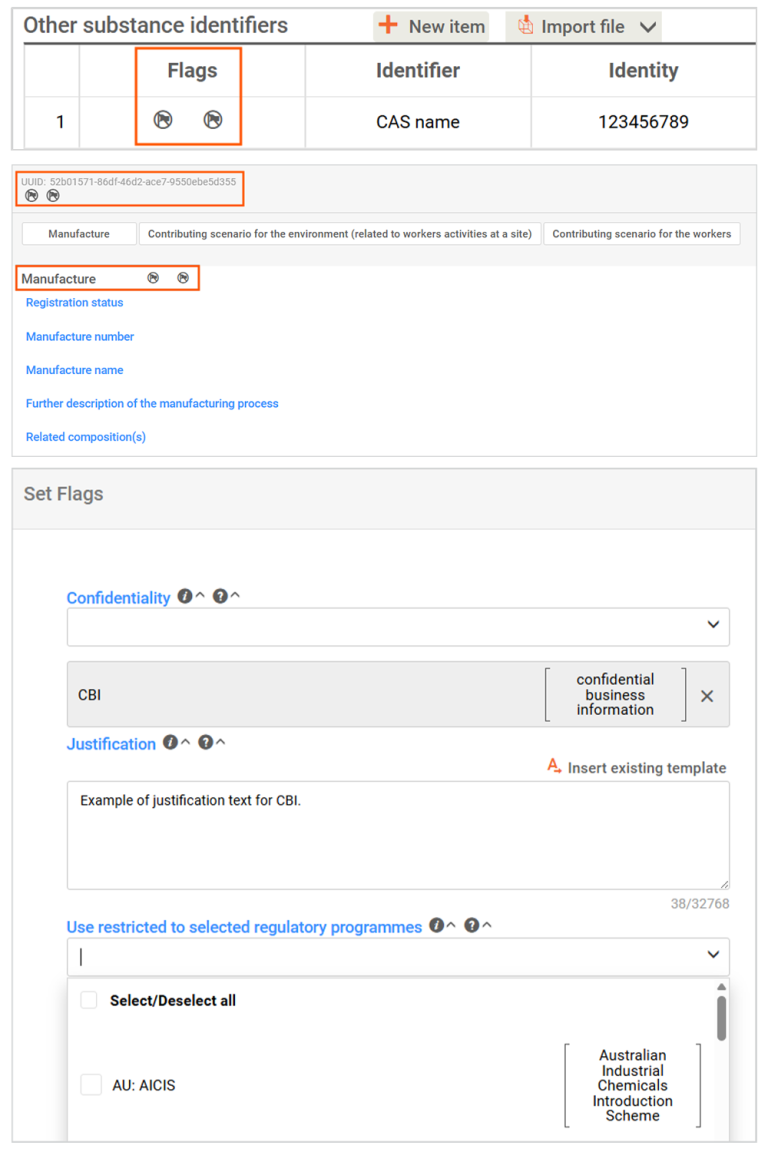
This image is 3 screenshots showing the flag icons in IUCLID for flagging as confidential business information (CBI), and the CBI details panel.

Important points to note

  • Flagging information as CBI does not remove the requirement to provide it to AICIS.
  • Some information cannot be flagged as confidential because it is required for assessment or publication.
  • AICIS will assess all CBI claims and may reject them if justification is insufficient.
  • All CBI is handled in accordance with AICIS confidentiality and publication requirements.

Using CBI in your application

When preparing your dataset:

  • only flag information as confidential where appropriate
  • provide clear and specific justification
  • follow section-specific guidance on what can and cannot be flagged.
Was this page helpful?
For broken links or technical issues, please provide as much detail as possible. Do not include your name, email address and other personal or commercially sensitive information.

Sign up to our monthly newsletter