
Guide on creating a chemical dossier in IUCLID for an assessment certificate application
Who is this guide for?
Introduction
This guide is for applicants, agents and chemical data providers involved in an assessment certificate application. It explains how to prepare and submit the International Uniform Chemical Information Database (IUCLID) component of an assessment certificate application.
IUCLID software is integrated into the AICIS assessment certificate application process. You must use IUCLID to create a comprehensive chemical dossier that includes information about the chemical which AICIS requires to assess an application, such as manufacture, use, exposure and hazard properties.
Who completes chemical dossiers
Each participant submits their own IUCLID dossier. Participants do not all submit the same dossier. Instead, each participant provides only the information they are responsible for.
This depends on their role and the information they hold. These can be:
- applicant(s), including the initial applicant and any joint applicant
- nominated agent(s), acting on behalf of a single participant
- chemical data provider(s).
Before you begin, confirm your role in the application. This will determine what information you need to include in your IUCLID dossier.
We assess all dossiers together as part of a single assessment certificate application.
Read more about participants and their responsibilities
Example – multiple applicants
If there is more than one applicant, each applicant (or the applicant’s agent) will have to provide manufacture, use and exposure data based on their business in separate dossiers.
Example – chemical data providers
A chemical data provider (or their agent) submits a separate IUCLID dossier containing the chemical identity and hazard data that they own or are authorised to provide. If a data provider supports more than one participant, they submit separate dossiers for each participant they represent.
How AICIS uses dossiers
After submission, we consolidate all dossiers we receive for an application into a single dataset. We then validate the dataset to check that all information requirements for the application have been met.
You are only responsible for the information relevant to your role.
Get started – create your chemical dataset in IUCLID
Introduction
After setting up your IUCLID environment, you will work mainly in 2 areas:
- Inventory manager
- Substances.
This page provides a high-level overview of the steps involved in preparing and submitting your IUCLID dossier for an AICIS assessment certificate. Each step is explained in more detail in later sections of this guide.
You do not need to complete these steps strictly in order. IUCLID is designed to let you enter and update information at any time before exporting your dossier. However, following this sequence will help you set up your dataset correctly and avoid common issues later in the process.
Step 1: Prepare your IUCLID environment
Before creating a dataset, you need to:
- install and access your own IUCLID instance
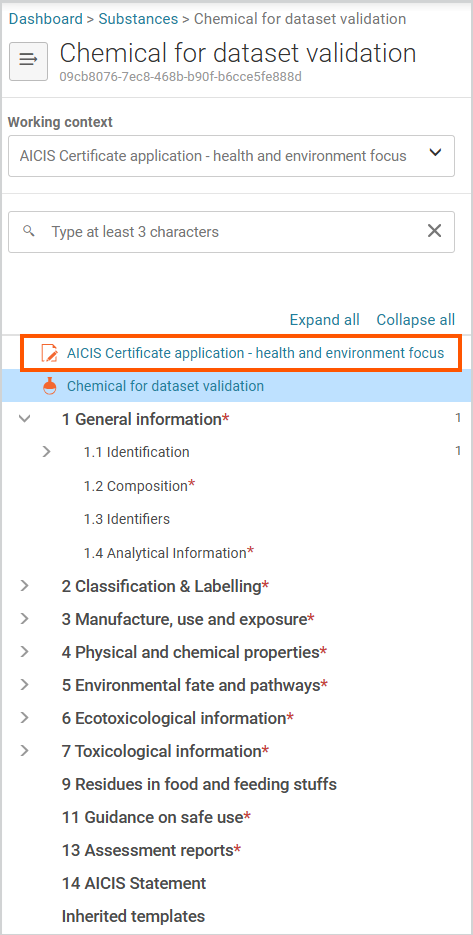
- confirm which AICIS certificate application working context applies to your dataset (also called an ‘AICIS working context’).
Tip: You can start IUCLID and begin setting up your dataset before gathering all information. You can update your data at any time before exporting your dossier.
Step 2: Create a substance dataset
A substance dataset is the central repository for all information you will submit in your dossier. At this stage, focus on creating the dataset and entering basic identification information (such as the substance name and legal entity) – you can return to it later to complete remaining fields.
To begin:
- create a new substance dataset
- select an AICIS working context
- give the dataset a clear, identifiable name under substance name
- ensure the correct legal entity is entered under 1.1 Identification (general information section).
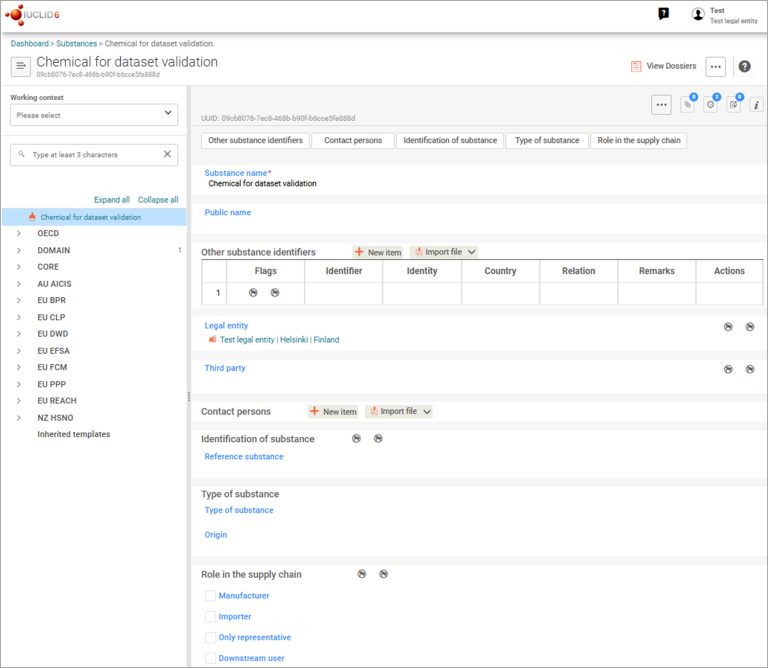
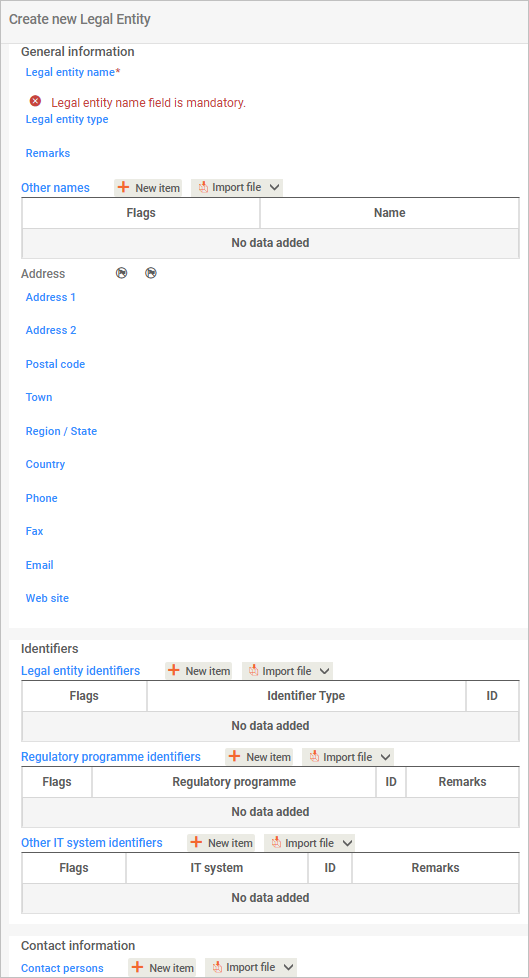
Legal entity includes the business applying for the assessment certificate and third parties, such as an agent.
If you are the applicant, select company from the dropdown list.
If there is an agent, select third party.
You do not need to complete Legal entity identifiers and Other IT systems identifiers.
You can complete the Regulatory program identifiers if your company takes part in any of the programs listed in the pick list. Select Other for AICIS.
See Section 1.1 for detailed guidance on completing identification fields.
AICIS working context
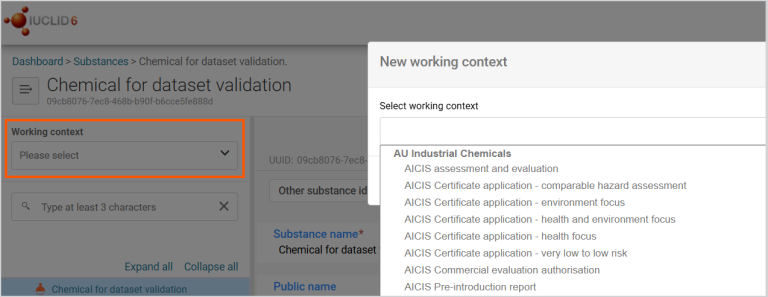
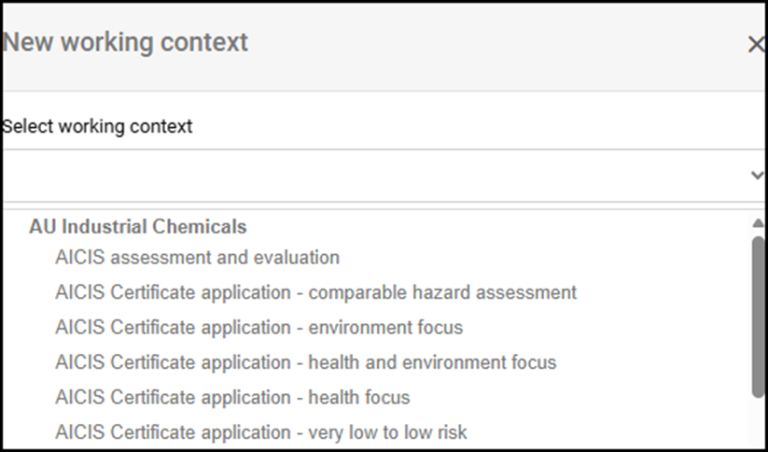
Select the AICIS application type under working context. After you do this, the AICIS working context will display.
Choosing the correct working context is essential as you cannot change it later. Do this before entering any data.
In IUCLID, a working context tells the system which information you need to provide and how it is structured for a specific application. Selecting an AICIS working context ensures:
- only relevant sections and fields display
- the dataset aligns with AICIS assessment certificate requirements
- correct IUCLID validation checks are applied.
Step 3: Set up reusable reference information (entities)
The entities stored in Inventory manager are pieces of information you can reuse. Once created, you can select and link wherever you need in your dataset. This helps you avoid repeating information and keeps your data consistent across sections.
Create reusable entities before you complete technical sections (for example, Section 3). This ensures you can select existing information instead of entering it again.
You can create reusable entities:
- in advance using the Inventory manager, or
- while completing a document when prompted.
You may need to create entities such as:
- legal entities
- contacts
- sites
- reference substances
- test materials
- literature references.
You can then use these entities across:
- multiple sections within a dataset
- multiple datasets
- future submissions.
Tip: The Inventory manager lets you create and store reusable reference information called ‘entities’. These can be linked to one or more substance datasets.
We explain this in more detail in the Reusable entities chapter.
Step 4: Complete required IUCLID sections
Next complete the IUCLID documents required for your AICIS working context. Complete all sections required for your role and application type.
We do not publish study reports or supporting documents that you attach in IUCLID.
Documents in IUCLID are grouped into sections, such as:
- General information
- Classification and labelling
- Manufacture, use and exposure
- Physical and chemical properties
- Environmental fate
- Ecotoxicological information
- Toxicological information.
We explain information requirements for each of these topics in our Substances section.
Important points
- Complete all required fields in each document.
- A document is considered complete when all required fields are filled and any relevant supporting information is included.
- You must also complete all required structured fields – do not rely on attachments alone, they are not enough.
- Some sections may not apply, depending on your dataset scope and role.
- Dynamic fields appear or disappear based on your earlier selections.
You must complete IUCLID documents based on your role in the application and the data you hold. You do not need to complete documents in numerical order as IUCLID uses numbering only to organise information.
Step 5: Address data gaps (if applicable)
If you cannot provide required information, you may need to:
- request an information waiver with appropriate justification – see our information waiver guidance
- use read-across approaches (analogue or category) – if you rely on read-across, you must follow our guidance to justify your approach and report it correctly in IUCLID (see How to report read-across in IUCLID).
- reference existing studies or literature.
You must report these approaches in IUCLID using the relevant document types and templates.
Step 6: Validate the dataset
The Validation assistant checks whether you’ve provided the key information for your application type. It produces a report that shows any failures or warnings and explains how to address them.
Resolve all validation failures. Address warnings where possible or explain them in the relevant fields before proceeding.
We step you through the validation process later in this guide.
Step 7: Export the dossier file
After validation:
- export the dataset as an .i6z dossier file
- select Export to previous major version to ensure compatibility
- if you identify an issue after export, update your dataset and export a new dossier.
- Confirm that the exported file reflects your final, complete dataset. The dossier you export is a read-only version of your dataset at the time of export.
We step you through this process thoroughly in our validation chapter.
Step 8: Keep your IUCLID records
Your IUCLID dataset:
- serves as your official record of information you have submitted
- allows you to reuse or adapt information for future submissions
- helps you meet your record keeping obligations.
Retain both the IUCLID dataset and the exported dossier file.
Key points to remember
- IUCLID organises information by documents and sections, not by process steps.
- Multiple participants (such as applicants, agents or chemical data providers) may create separate dossiers for a single assessment certificate application.
- To avoid delays it’s essential to follow our validation steps and to correctly export the dossier file.
- IUCLID datasets are participant specific, but we assess the dossiers together.
Next: learn how to navigate IUCLD and complete common field types before starting your dataset
IUCLID fields and navigation
Use this section to help you navigate IUCLID and understand what the common field types are. You can use information on this page alongside the instructions in each section of this guide.
How IUCLID is organised
IUCLID organises information into:
- sections (for example, manufacture, use and exposure)
- documents within each section, including endpoint records
- fields or repeatable tables within each document.
To enter information in IUCLID, open a document and complete its fields.
The sections and documents available depend on the AICIS working context you selected.
ECHA information on IUCLID features
See more detailed information on using the IUCLID interface and navigation published by the European Chemicals Agency (ECHA).
Navigate between sections
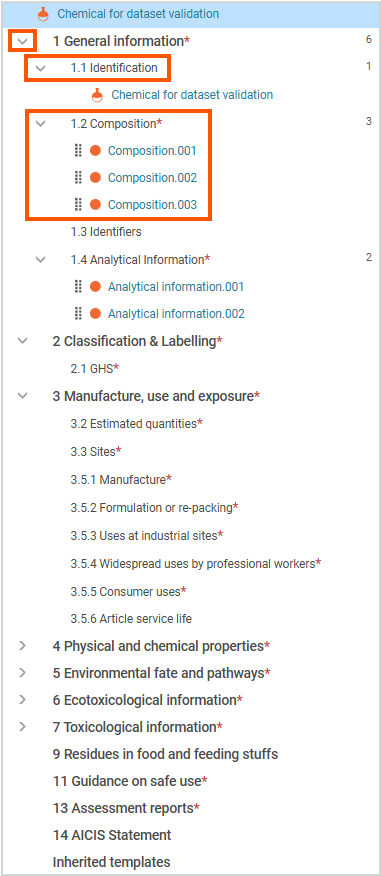
- Use the navigation panel on the left-hand side to expand and move between sections
- Select a document to open it and enter information
- Each document contains the fields you need to complete
- Some sections and fields will appear or change depending on your earlier selections.
Common field types in IUCLID
Pick lists
- Select a value from a list
- Use pick lists to ensure consistent and valid data
Short text fields
Use these fields to enter simple, unformatted text, such as:
- short explanations
- supporting comments
- brief descriptions (for example, Details on tonnage reported).
Numeric fields
- Enter numbers only (do not include units or text)
- Select the correct unit separately where required
- Some fields allow decimal values – follow field instructions
Remarks fields
Use this field to provide additional context or explanation. This may include:
- assumptions or conditions
- supporting information
- explanations of how values were derived.
Rich text fields
Rich text fields allow you to enter formatted and structured content. Use them for:
- detailed technical descriptions
- study summaries
- tables or structured data
- images (where supported).
Add entries using New item
If you have more than one value or scenario to report, add a separate entry using New item. If only applies, create a single entry.
Use this to report each value or scenario separately. For example:
- multiple compositions
- multiple exposure scenarios
- multiple results.
Each entry represents a separate value or scenario within the same document.
Add nested entries
Some sections require multiple levels of information:
- First, add a main entry using New item.
- Then add additional entries within it, also using New item.
Example – Section 3 (Manufacture, use and exposure):
- Create a contributing scenario.
- Then add exposure or release information within that scenario.
Repeatable fields/tables
Create a reusable entity if the same information is used in more than one place (for example, a site used in multiple sections).
Repeatable fields (tables) let you add multiple entries within a single document.
Each entry represents a separate value or scenario. For example, multiple results or exposure scenarios.
Select New Item to add each additional entry.
Dynamic fields
Some fields appear or change depending on your selections.
Confidentiality fields
You can flag some fields as confidential business information (CBI).
See our CBI guidance for requirements and instructions
Tips for completing IUCLID fields
Each section will remind you to:
- complete all required fields – do not rely on attachments alone, they are not enough
- use the structured fields wherever available (for example, pick lists and tables)
- use Remarks to explain complex information
- add separate entries for different scenarios or values.
IUCLID document numbering
IUCLID automatically assigns documents numbers (for example, .001,.002) when you create documents. These system generated numbers reflect the order in which documents are created. You do not need to manage or edit numbering.
Next, tips on managing confidential business information in IUCLID
Confidential business information in IUCLID
IUCLID allows you to flag certain information as confidential business information (CBI). This helps protect commercially sensitive information while still allowing AICIS to assess your application.
How AICIS handles confidential information is governed by our assessment certificate confidentiality and publication requirements. These determine what information can be treated as confidential and what can be published.
Learn more about confidentiality in assessment certificate applications
How CBI works in IUCLID
You can flag confidential information at different levels, depending on the field or document:
- individual fields (where CBI is permitted)
- entire documents
- regulatory use (by jurisdiction)
Not all fields allow CBI flagging. You must follow the guidance in each section to determine where CBI can be applied.
How to flag CBI
Where CBI flagging is available:
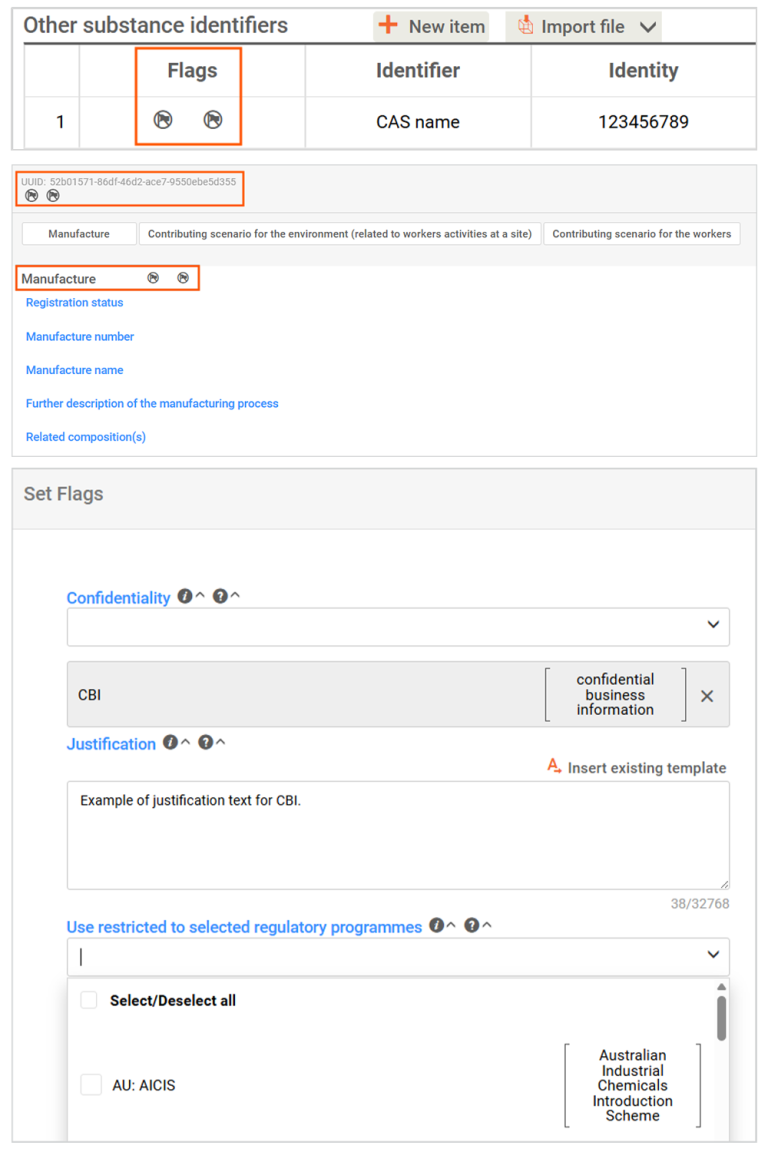
- select the CBI or regulatory use flags at the top left of the document or field
- complete any required justification. Make sure your justification aligns with our confidentiality requirements for assessment certificate applications.
You must clearly explain why the information is confidential. We may request more information if the justification is not sufficient. Adding regulatory use restriction allows you to specify how the information may be used across jurisdictions. For example, this may apply where data is only authorised for use in a particular regulatory context or is subject to access or ownership limitations.
Important points to note
- Flagging information as CBI does not remove the requirement to provide it to AICIS.
- Some information cannot be flagged as confidential because it is required for assessment or publication.
- AICIS will assess all CBI claims and may reject them if justification is insufficient.
- All CBI is handled in accordance with AICIS confidentiality and publication requirements.
Using CBI in your application
When preparing your dataset:
- only flag information as confidential where appropriate
- provide clear and specific justification
- follow section-specific guidance on what can and cannot be flagged.
IUCLID – Reusable entities
Use this section to learn how to create and manage reusable entities in IUCLID, such as legal entities, contacts, sites and reference substances.
Reusable entities allow you to enter information once and reuse it across multiple documents and datasets. Set these up early to reduce duplication and maintain consistency in your application.
What is a reusable entity in IUCLID?
Reusable entities are reference data that you can create and store in IUCLID. Once you create them, you can select and link these entities wherever they are required in your dataset.
You can create entities:
- while completing a substance dataset under Substances
- directly in the Inventory manager.
What is the Inventory manager?
The Inventory manager is where you create and manage reusable reference data (such as legal entities, sites and contacts) that your substance dataset will use.
In simple terms, it holds the ‘who, where and what’ information that substance datasets point to.
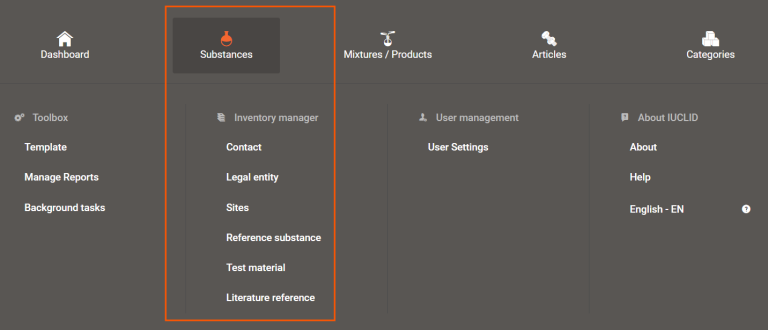
How to access the Inventory manager
Links to the Inventory manager appear under Substances on the dashboard menu from the IUCLID home page.
How to use Inventory manager to help you complete your dossier
The following examples show how the Inventory manager supports data entry in IUCLID:
Example 1 – Sites
You may have several manufacturing sites in Australia, but not all sites manufacture the substance in your application. By creating site entities in the Inventory manager, you can select only the relevant sites when completing your exposure information.
Example 2 – Literature references
Some study reports contain results for multiple endpoints. By creating a literature reference once, you can link it to multiple documents and sections within a substance dataset (for example, across different physical and chemical property endpoints).
What you manage in the Inventory manager
The Inventory manager has these entities:
Contact
Use contact entities to store details for people involved in the application, such as:
- applicants (business contacts)
- chemical data providers (application contacts)
- agents.
The IUCLID contact type list includes:
- competent person responsible for the safety data sheets (SDS)
- emergency contact
- substance manager
- toxicologist
- other.
For AICIS purposes, select Other and enter the appropriate AICIS contact role (for example, business contact, application contact, agent, chemical data provider).
You can link contact entities in Section 1.1 Identification, under Contact information.
Legal entity
Legal entities represent the businesses involved in the application.
Use to create legal entity entries under Section 1.1 Identification:
- select company if your business is the applicant
- select third party if your business is acting as an agent or chemical data provider.
You do not need to complete:
- Legal entity identifiers
- Other IT systems identifiers.
For Regulatory program identifiers, select Other for AICIS.
Sites
- Site entities are relevant for Australian manufacturers.
- A substance can be manufactured at multiple sites.
- A site can manufacture more than one substance.
You can link sites under Section 3.3 Sites when completing Manufacture, use and exposure information.
Reference substance
Reference substance stores basic, and relatively constant information about a substance. For example, chemical name and molecular weight.
Test material
Test material stores information about variations of the substance, such as purity or concentration.
You can link each reference substance to one or more test materials for reuse across multiple substance datasets.
Literature reference
Literature references store documents and reports that support the information in your dataset.
To create a literature reference, you must:
- provide at least the document title
- complete the relevant fields.
You can upload attachments such as PDF and DOCX files to a literature reference.
How Inventory manager data is used in your application
- The entities in the Inventory manager are set up once, then reused.
- Most users will interact with it before or alongside creating documents within the substance datasets.
- Substance (chemical) datasets created under Substances will reference data held in the Inventory manager.
You do not generally submit Inventory manager data on its own. It is included automatically when you link it to a substance dataset.
IUCLID – Substances
Introduction
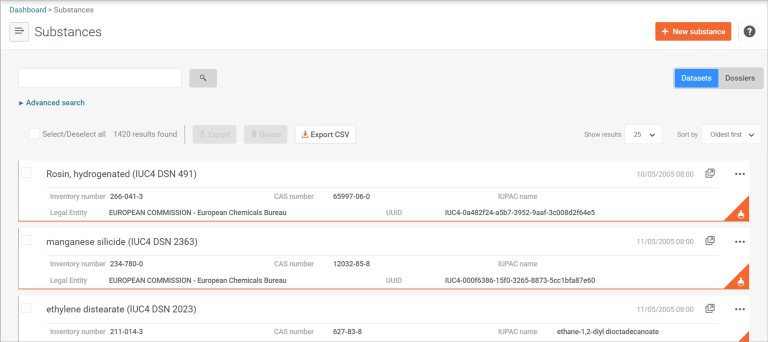
IUCLID uses the Substances feature to store information about individual chemicals.
In regulatory terms, a substance represents a single chemical substance.
IUCLID stores substance datasets under Substances. A substance dataset is a collection of IUCLID documents that together form the chemical dossier for a specific regulatory purpose.
You create and open substance datasets from the Substances section. IUCLID only shows sections and documents after you open a substance dataset.
Validation assistant
Use the Validation assistant to check that your dataset meets AICIS requirements before you submit it.
Read more about validating your chemical dataset in IUCLID.

This image is a screenshot of the 'Validate' and 'Create dossier' buttons in IUCLID.
Table of contents
Once you open a substance dataset, IUCLID displays a table of contents showing all sections and documents in your dataset. The table of contents:
- generates based on the AICIS working context you selected
- shows all required sections and documents for your application type
- organises information into sections and sub-sections.
Use the table of contents as a guide to identify the documents you need to complete. Note that section numbers do not represent a workflow and do not need to be completed in order.
Explore substance sections guidance
IUCLID sections 1–7 do not represent steps. They group information by topic. You do not need to complete them in order.
Section 1 – General information
Introduction
This section explains how to establish the identity, ownership, and technical context of your substance in IUCLID for an AICIS assessment certificate application.
The general information you enter in IUCLID (Section 1) are generally the same for all certificate application types.
The information you enter in Sections 1.1 Identification, 1.2 Composition and 1.4 Analytical information defines:
- the substance (or substances) being assessed
- who is responsible for the application
- how the substance is identified, described and distinguished from similar chemicals.
Much of the information is reused or referenced throughout the IUCLID dataset, including in classification, exposure, hazard and confidentiality decisions. It is therefore important that you complete these sections accurately before moving to the next chapters.
How this section is structured
Each section builds on the previous one.
For example, reference substances selected in Section 1.1 are reused when reporting constituents in Section 1.2, and analytical data in Section 1.4 should support the compositions described.
Confidentiality and publication considerations
Some fields in this section allow you to flag information as CBI. You must provide required justifications.
Some fields cannot be flagged as confidential, such as the substance name as AICIS may use this information for identification or publication purposes.
See our CBI guidance for more information.
Section 1.1 – Identification
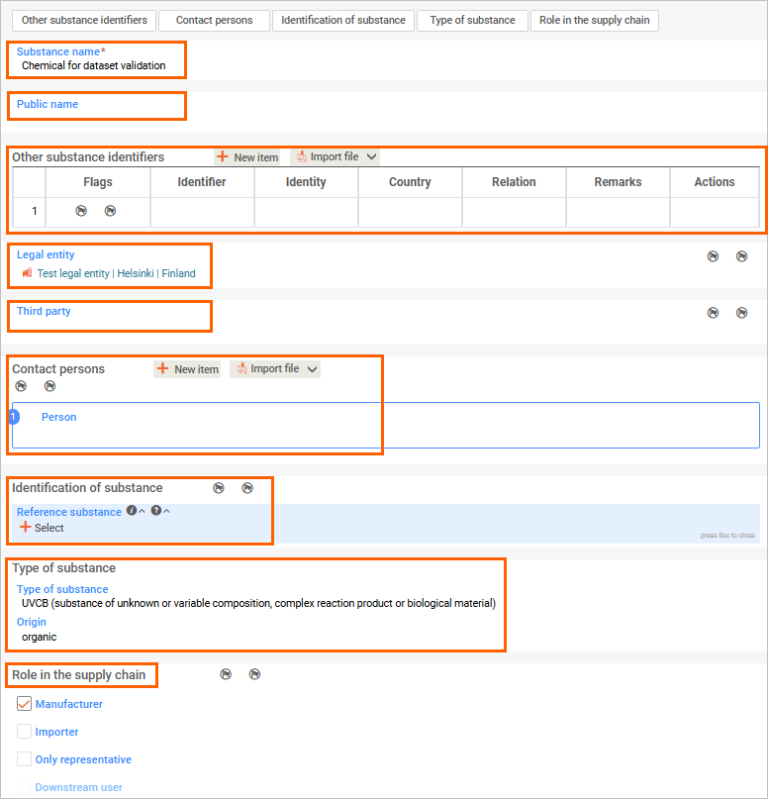
This section establishes the identity of your substance and the organisations involved in the application. It is where you enter the key identification details such as the substance name, legal entity, contact details, and how the substance is identified in IUCLID.
The information you enter here forms the basis for other sections of your dataset and is reused throughout the application.
Substance name
This is a unique name in the IUCLID instance and relates to your application in an AICIS working context. You can link this later to reference substance(s) that identifies the substances to be assessed under Identification of substance below and under 1.2 Composition.
Public name
This is the name for publication of the AICIS Assessment Statement. The working legal entity is the legal entity that created the substance dataset or filled in the fields for substance name and legal entity (the 2 mandatory fields in this section).
Other substance identifiers table
- Select New item to provide other information about the identity of your substance.
- You can use the table to flag CBI, with justification.
- Select the type of identifier, (e.g., CAS number, CAS name, trade name) and type the identifier in the free text field.
Legal entity
You can select the legal entity that already exists (created under the inventory manager), or you can create a new one.
Third party
Includes agents and chemical data providers acting on behalf of the applicant. When a third-party legal entity is created, associated contact persons can also be recorded.
Contact persons
Select a contact person created under the Inventory manager or create a new one.
You can set a CBI flag for each contact person.
Identification of substance
- Select a reference substance from the list or create a new one if needed.
- You can flag this as CBI, unlike the substance name.
Type of substance
Select from pick lists – for example, mono or multi-constituent, UVCB, polymer, etc) and origin (e.g., element, inorganic, organic, etc).
You cannot flag these as CBI.
Role in the supply chain
The checkbox under this heading is:
- Manufacturer
- Importer
- Only representative
- Downstream user.
Roles in the supply chain can be flagged as CBI.
Note the distinction between an only representative, a downstream user and an importer in IUCLID:
- Only representative is a natural or legal person established in a certain region, appointed by a manufacturer outside that region to meet the regulatory obligations on importers.
- The importers in the same supply chain are downstream users of the only representative.
Section 1.2 – Composition
This section describes the composition of your substance. You must provide details of the different compositions (if applicable), including constituents, impurities and additives, and their relative proportions.
Your substance may have one or more compositions (for example, multi-constituent substances or UVCBs).
This information defines what your substance is and supports its identification, classification and assessment throughout your application.
Create composition records
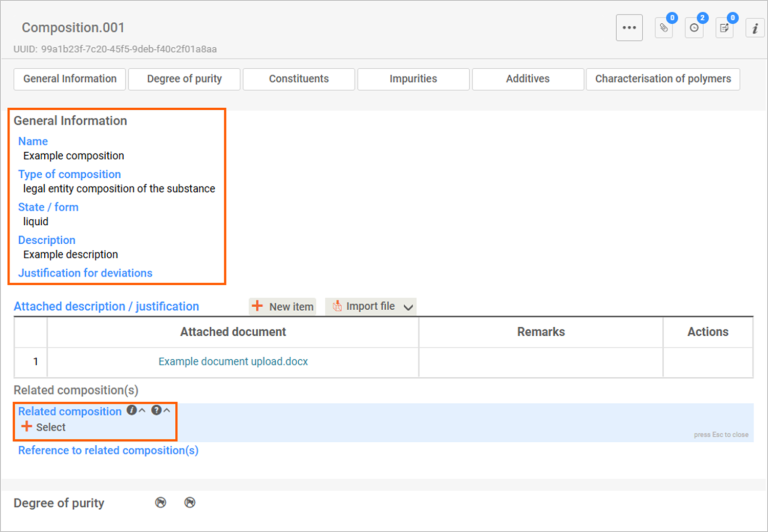
Create a document for each composition (for example, Composition.001).
Complete the General information fields:
- Name (actual composition)
- Type of composition (for example, legal entity composition)
- State/form of the substance.
If you select solid: nanoform, an additional section for nanoform characterisation will appear. You will be able to flag confidentiality when you get to this stage.
Multiple compositions
If your substance has more than one composition:
- link related compositions using Related composition(s)
- provide the purity for each composition
- the information can be flagged as confidential where appropriate.
Constituents, impurities and additives
For each composition:
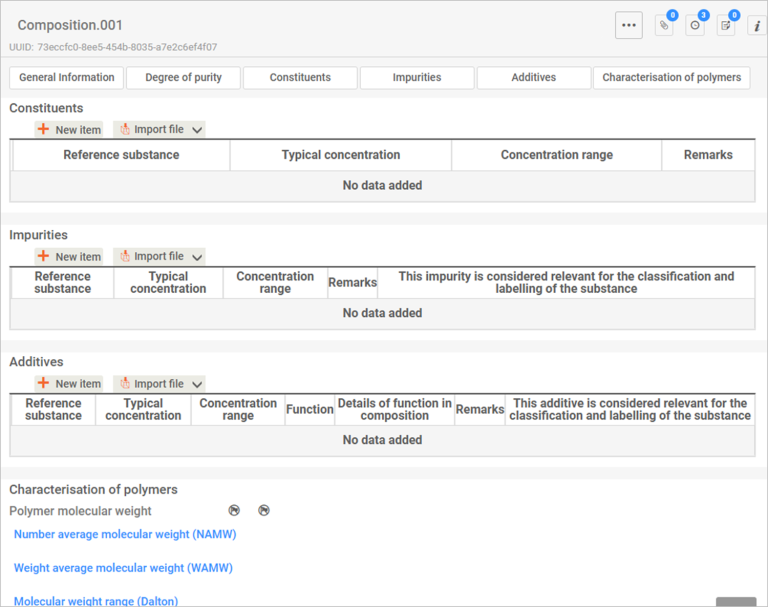
- provide details of constituents, impurities and additives
- include their relative proportions.
Each composition must include at least one constituent.
To add a constituent:
- select New item
- select or create a reference substance
- enter the concentration of the constituent.
You should:
- complete impurity and additive information where relevant
- indicate whether impurities/additives affect classification and labelling.
Unknown impurities
You can report unknown impurities by:
- creating a reference substance named Unknown impurity
- describing the impurity under Remarks.
Polymers (if applicable)
If your substance is a polymer, complete the Characterisation of polymers section.
You can flag this information as confidential where appropriate.
Composition information needed for polymers
Constituents table
Provide identity and percentage of all polymer starting materials.
Impurities table
Provide the percentage residual of each starting material remaining (by weight) following completion of the polymerisation.
Characterisation of polymers
Provide the following:
- molecular weight range
- number average molecular weight (NAMW)
- weight average molecular weight (WAMW)
- the percentage by mass of molecules with molecular weight that are < 1,000 g/mol, and < 500 g/mol
- identity of any moderate or high concern reactive functional groups contained in the polymer
- the functional group equivalent weight (FGEW) (if applicable).
Section 1.4 – Analytical information
This section provides analytical information to confirm the identity of your substance. You must include the methods and results used to characterise the substance.
This information supports and verifies the composition described in Section 1.2.
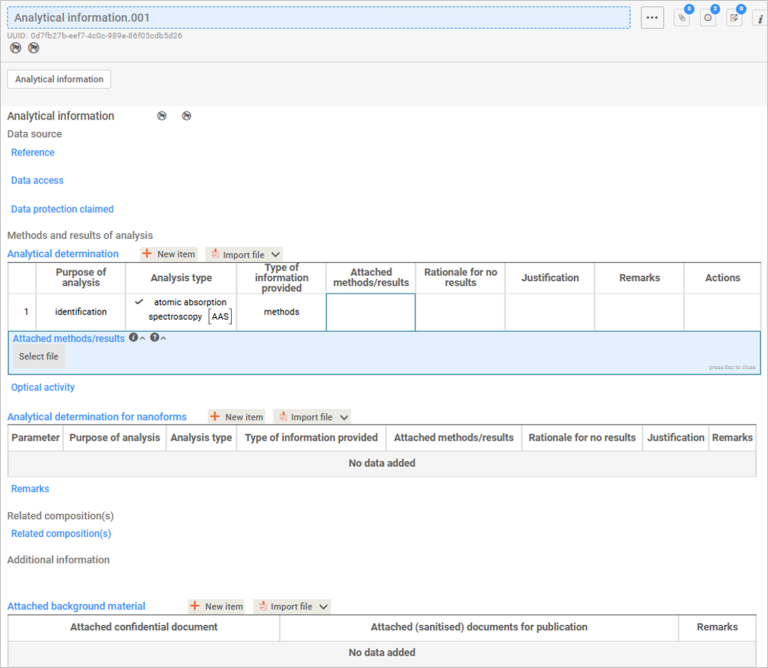
- Create a document (e.g. Analytical information.001) and include the information for each method performed to characterise the identity of your substance in the analytical determination table.
- You must provide enough information to sufficiently characterise the chemical, such as nuclear magnetic resonance (NMR) spectroscopy, liquid chromatography-mass spectrometry (LC-MS) or Fourier-transform infrared (FT-IR) spectroscopy analytical report.
- If introducing a polymer, you must provide a gel permeation chromatography (GPC) or equivalent analytical report.
Methods and results of analysis
- Provide all analytical information in the table. Select New item to add a new entry and set the values of the analytical determination.
- If the purpose is for identification and quantification, make sure you reflect these in the pick list choice.
- Provide more information in Remarks, if needed.
Related composition
You can link a composition (created in Section 1.2 Composition) to this field.
If you are introducing a chemical with multiple compositions, create one analytical information document for each chemical composition.
Section 2 – Classification and labelling
This section records how the substance is classified and labelled for physical, human health and environmental hazards.
The classification and labelling information you enter in IUCLID (Section 2) is generally the same for all certificate application types
You must classify your chemical according to the Globally Harmonised System (GHS) and provide the relevant hazard information. This information is required for all application types and supports the assessment of risks to human health and the environment.
See Types of assessment applications and information required in the Guide to applying for an assessment certificate for a summary of information required for this section.
Section 2.1 – GHS
Create one document for each GHS record.
A GHS classification record includes all hazard endpoints for a substance or composition. You may need more than one record where classifications differ (for example, for different compositions such as UVCBs).
Use a clear and descriptive document name, including concentration, where relevant. For example, GHS classification of substance with more than or equal to 1% concentration.
You can flag CBI and restrict regulatory use (by jurisdiction) for each document.
Complete information under the following headings:
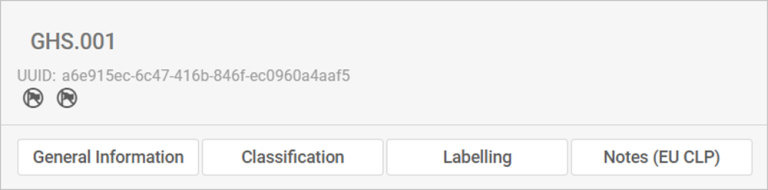
General information
- Enter the chemical name as it appears on the record, such as the name used in a safety data sheet.
- Select the Not classified checkbox if your substance is not classified.
- Under Implementation select the relevant jurisdictions for the classification. Link the classification to the relevant composition under Section 1.2 Composition.
- Under Type of classification, select whether classification is harmonised (GHS) or self-classification (by the manufacturer or importer).
- Use a descriptive name for the substance (including concentration where relevant).
- Create a different document for each distinct classification.
Classification
- You will find a long list of hazard endpoints covering physical, human health and environmental hazards.
- Review all endpoints and classify those that are relevant by completing the Hazard category and Hazard statement.
These fields must match – so the right hazard statement goes with the right category.
Important: Data lacking is selected by default under Reason for no classification, which deactivates Hazard category and Hazard statement. This setup reflects the reality that most of these hazard endpoints lack sufficient data for classification.
Remove Data lacking in Reason for no classification to activate these fields.- Some endpoints under human health hazard also require you to indicate the specific effect and route of exposure.
- If you have information on specific target organ toxicity, single or repeated exposure, you can report this using repeatable tables.
- You can also provide information on specific concentration limits for environmental hazards, the ozone layer and other additional hazard classes.
Labelling
Complete all labelling fields, including:
- GHS hazard statements
- Additional non-GHS hazard statements (if applicable).
Notes
Use this field to provide additional context or explanations.
Section 3 – Manufacture, use and exposure
The manufacturing information you enter in IUCLID Section 3 is generally the same for all certificate application types
See Types of assessment applications and information required in the Guide to applying for an assessment certificate for a summary of information required for this section.
Get started with Section 3
In this section, you must describe how your substance is manufactured, supplied and used, and identify where exposure to people and the environment may occur.
We recommend you first map the process (lifecycle) of the substance (for example, using a simple diagram) to understand how the substance is manufactured, handled and used.
Exposure scenarios (use descriptions)
In IUCLID, exposure scenarios are also called 'identified uses' or 'use descriptions'.
Assign exposure scenarios (use descriptions) for each stage of the substance’s lifecycle, including:
- manufacture
- formulation or re-packing
- uses at industrial sites
- widespread uses by professional workers
- consumer uses.
Although manufacture is not a ‘use’, you must still describe it as part of the substance's lifecycle.
Volume allocation
You must allocate the total annual quantity of the substance across lifecycle stages and use scenarios (for example, manufacture, formulation and end use).
- Enter the total annual tonnage provided in Section 3.2 Estimated quantities.
- In sections 3.5.1 to 3.5.5, enter only the portion relevant to each activity or use.
The total across all activities and uses must match your Section 3.2 estimates.
Common fields across Section 3
The following fields appear in most Section 3 documents:
- Tonnage of substance for this use
- Details on tonnage reported
- Number of workers using the substance
- Contributing activities (environment and workers)
- Use takes place under rigorously contained conditions.
Complete these fields consistently across all relevant sections.
Reporting tonnage across Section 3
You must report annual tonnage in Section 3.2 and allocate this across activities and uses in sections 3.5.1 to 3.5.5. The totals across all uses must match your Section 3.2 estimates.
Naming and describing activities
- Use clear, descriptive names that distinguish each activity or use.
- Avoid generic names such as Activity 1.
- Provide a detailed technical description of each process or use.
General tips for Section 3
- Use Remarks to provide additional context (for example, assumptions or estimates).
- Link existing data (sites, compositions, entities) where possible.
- Flag CBI only where appropriate and provide justification.
3.2 – Estimated quantities
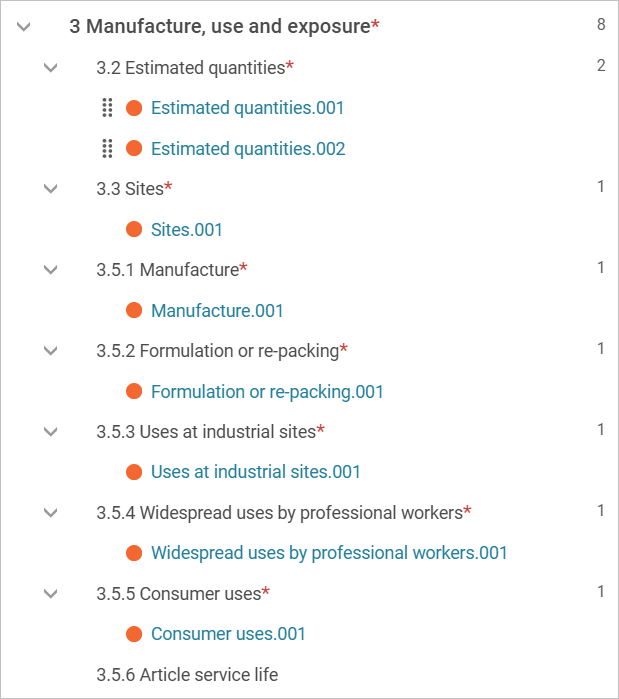
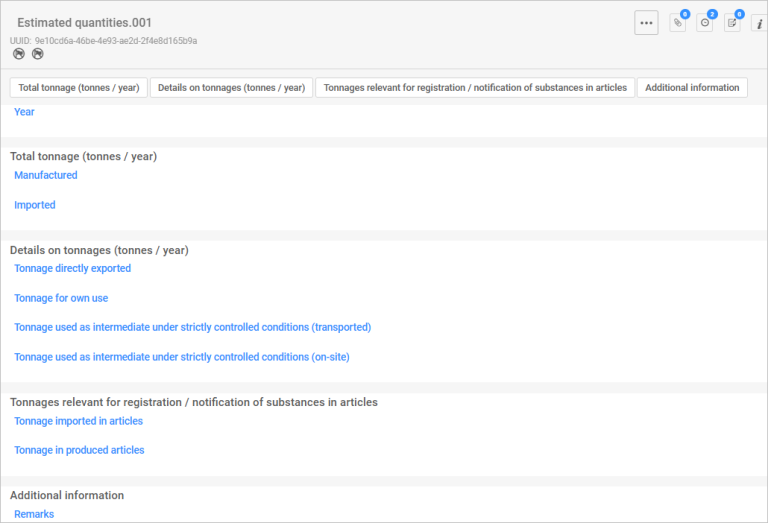
In this section, you must report the total annual quantity of your substance for each year of the 5-year certificate period.
To report quantities:
- Create 5 documents (one for estimated quantities for each of the 5 years of the certificate). Select the plus button (+) to create each document.
- Enter the total annual tonnage (manufacture and import combined) for each year:
- Estimated quantities.001 (first year)
- Estimated quantities.002 (second year)
- Estimated quantities.003 (third year)
- Estimated quantities.004 (fourth year)
- Estimated quantities.005 (fifth year).
You can flag CBI and restrict regulatory use (by jurisdiction).
Use Remarks to provide any extra information. For example, details of flagged CBI. Be specific on which tonnage you wish to flag (import, manufacture or both). Also provide:
- justification for flagging the specific tonnage
- the tonnage value you want published (the non-CBI value).
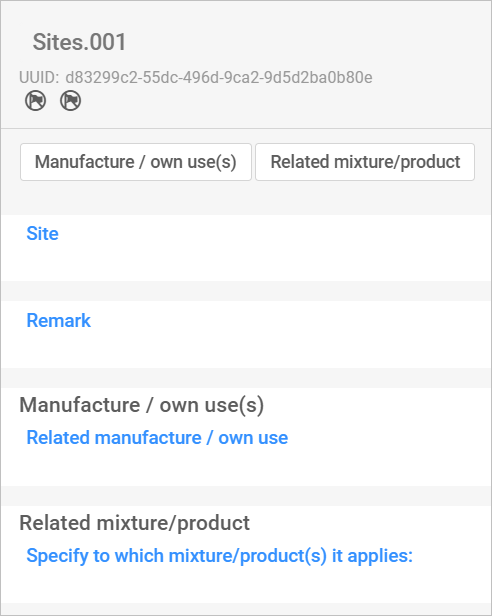
3.3 – Sites
Add and select sites
- Add all relevant sites (Australia or overseas).
- Select the plus button (+) and choose from existing sites. If your site is not on the list, select Create to add a new one.
- For each site, you can flag CBI and restrict regulatory use (by jurisdiction)
Link sites to activities
For each site you have selected or created link to all applicable activities:
- Manufacture – Section 3.5.1 Manufacture
- Formulation – Section 3.5.2 Formulation or re-packing
- Use at industrial sites – Section 3.5.3 Uses at industrial sites.
3.5.1 – Manufacture
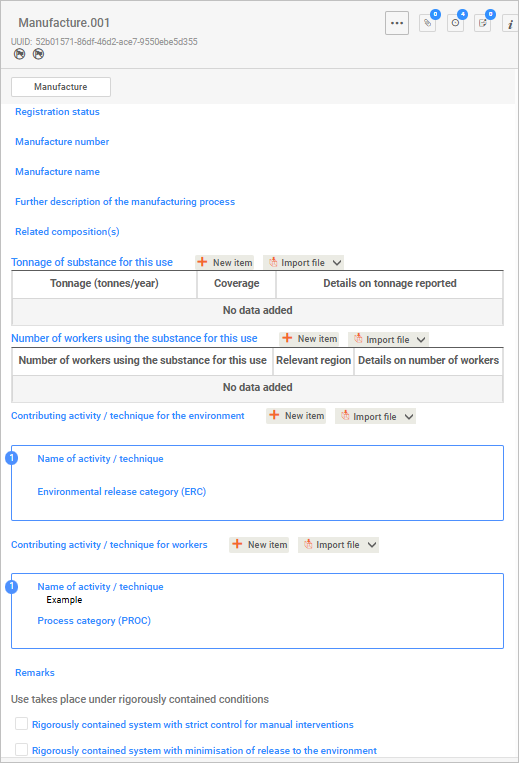
In this section, you must describe how the substance is manufactured.
Create one document per manufacturing activity.
Key fields
Manufacture name
Use a clear, descriptive name that distinguishes each manufacturing activity from others.
Further description of the manufacturing process
Provide a detailed technical description of the process. Include relevant operational steps, diagrams, tables, or other structured information, if useful.
Related composition
You can link a composition created in Section 1.2 Composition, if relevant.
Tonnage of substance manufactured (tonnes/year)
- Enter the annual tonnage for the manufacturing activity. Do not enter your total import or manufacture volume (as reported in Section 3.2 Estimated quantities) – only the portion used for this activity.
- Select Coverage from the pick list or select Other if the value is not listed and enter the relevant information.
- Use Details on tonnage reported to explain the reported tonnage, including assumptions, estimates or projections.
Number of workers using the substance for this use
Enter the number of workers involved in the activity.
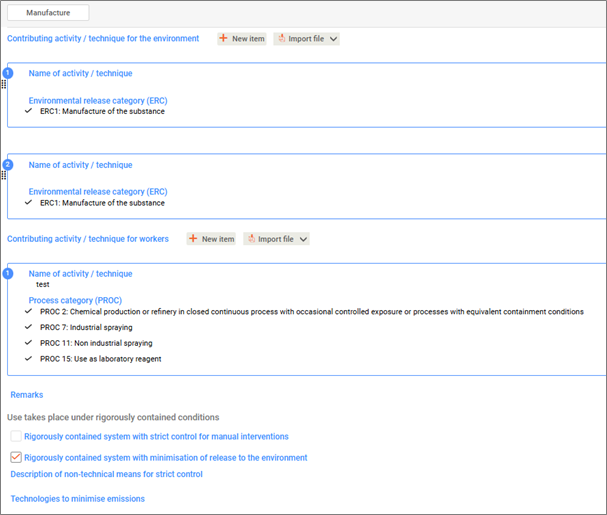
Contributing activity / technique for the environment (ERC)
- List as many activities and techniques relating to the environment as relevant.
- Select New item and enter a descriptive name.
- Review the Environmental release categories (ERC) carefully and select those that apply.
Contributing activity / technique for workers (PROC)
- List as many activities and techniques relating to workers as relevant.
- Select New item give a descriptive name.
- Review the Process categories (PROC) carefully and select those that apply.
Use takes place under rigorously contained conditions
Select the option that best describes the conditions for this activity or use. Different/additional fields will display depending on your selection.
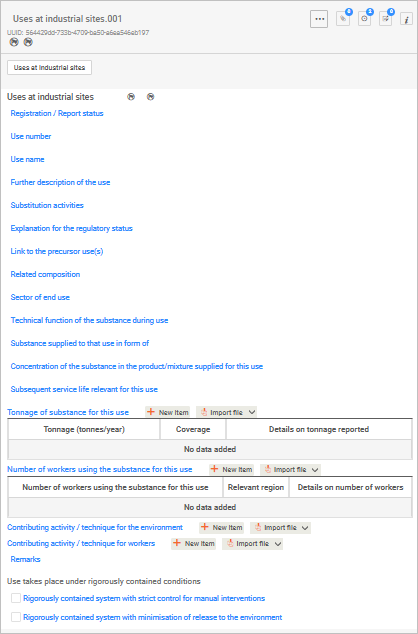
3.5.4 – Widespread uses by professional workers
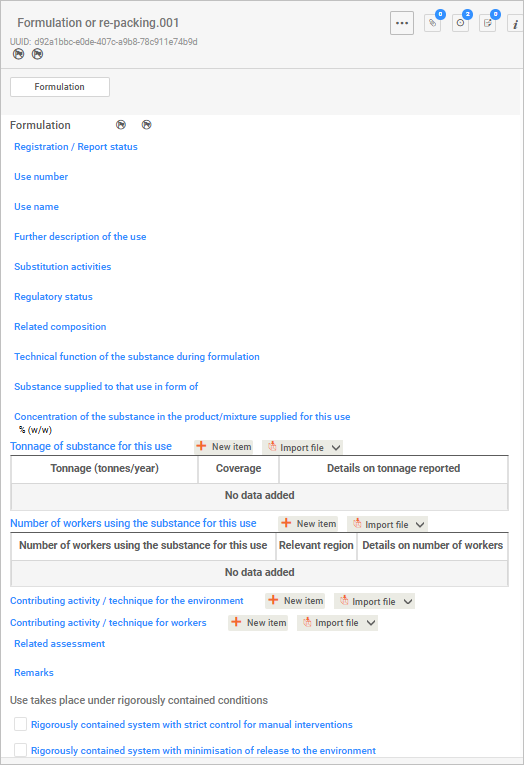
The fields required in this section are the same as those in Section 3.5.3 Uses at industrial sites, adapted for the relevant use type.
This section describes widespread use by professional workers.
Create one document for each type of widespread use.
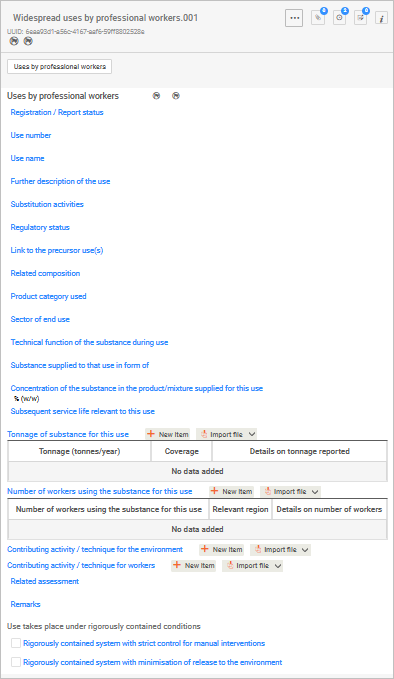
3.5.5 – Consumer uses
The fields required in this section are the same as those in Section 3.5.2 Formulation or re-packing adapted for the relevant use type.
This section describes consumer uses of the substance.
Create one document for each type of consumer use.
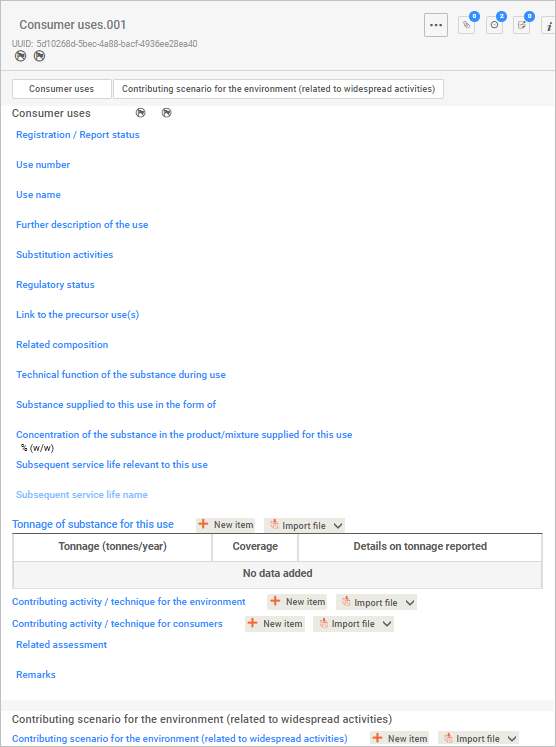
Key fields
Regulatory status
Use this field to elaborate on the international regulatory status.
Technical function of the substance during use
Select all functions that apply (multiple selections allowed).
Section 4 – Physical and chemical properties
This section records intrinsic physical and chemical characteristics of the substance.
The physical and chemical properties you enter are generally the same for all certificate application types.
You must provide core physicochemical properties (for example, melting point, boiling point, density, vapour pressure and water solubility). Some properties are only required if available, depending on your chemical and data you hold.
See Types of assessment applications and information required in the Guide to applying for an assessment certificate for a summary of information required for this section.
If you cannot provide information for a required physical and chemical property endpoint, you must request an information waiver and provide appropriate justification.
See our information waivers guidance
Important: Do not select ‘experimental study planned’ or ‘experimental study planned (based on read-across)’. AICIS does not accept these options.
Note: these hints are for all endpoints (e.g., melting point, density, etc).
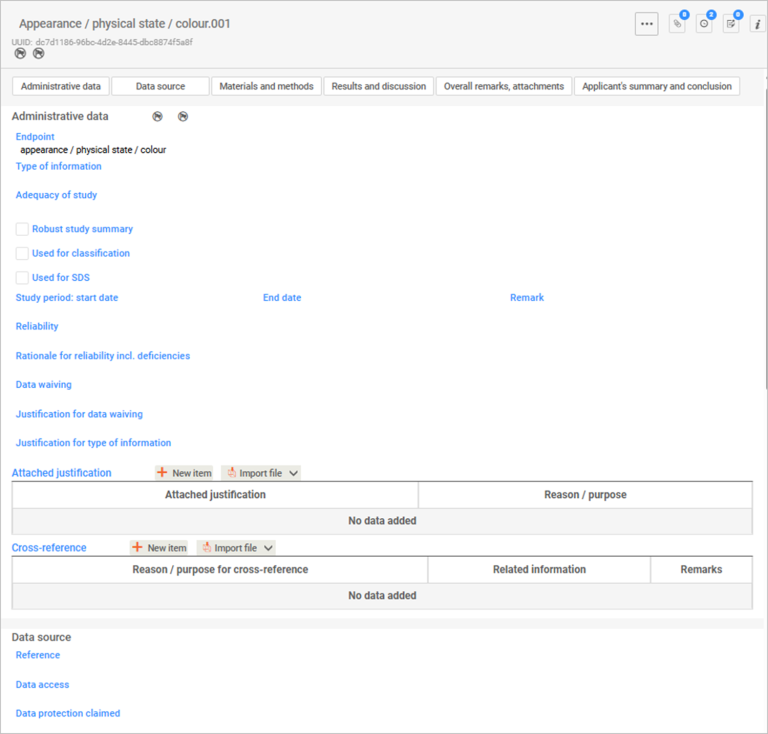
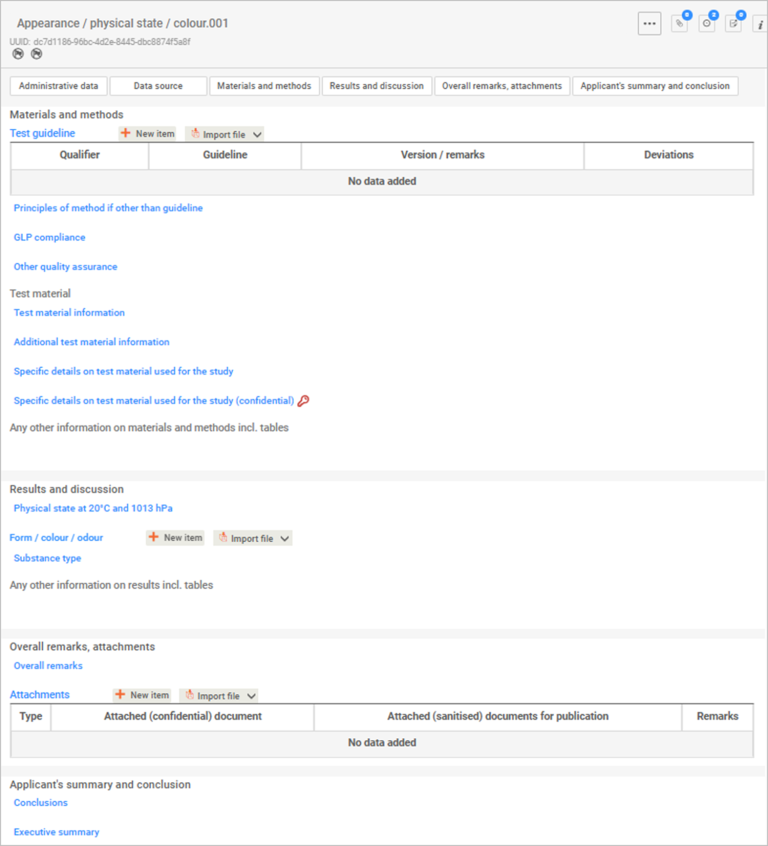
Administrative data
This information is not eligible for flagging as CBI:
– Physical and chemical data that do not reveal the chemicals composition.
– Summaries of data relating to risks to human health or the environment.
Use the help text provided to complete the fields of each endpoint.
Endpoint
Select the endpoint from the pick list.
Even though the endpoint is clearly indicated in the title (e.g., Boiling point.001), there may be more than one endpoint title. In the case of boiling point, you can select either boiling point or temperature of decomposition.
Provide any comments under Remarks about the endpoint, such as the subtitle of the endpoint report.
Type of information
Select from the pick list to specify the basis of the endpoint study.
If you are applying to waive an information requirement – you will need to provide a justification. If applying, select an option in the data waiving and justification pick list. You can also select other justification then describe what it is, if the standard phrases provided do not meet your circumstances.
Adequacy of study
Select the description from the picklist of how the endpoint study above is used to meet the information requirements for the chemical under your assessment certificate application.
Study period
this information is required to determine if an animal test study is the right information to provide if your chemical is for cosmetic use only.
Data source
This is the literature reference for the endpoint study record.
You can create this through Literature reference under Inventory manager. You can also create the reference here once a pop-up window appears.
Select Create for more than one Literature reference.
Data access and Data protection claimed
This information is required if you are seeking to protect CBI.
Materials and methods
Test guideline – this is a critical field as it identifies the guideline used and whether this is acceptable, based on our requirements. Depending on the endpoint, a pick list is available for you to select the relevant test guideline. For example, Organisation for Economic Co-operation and Development (OECD) Guideline 103.
If the test was not conducted according to a test guideline, provide details on the principles of the method used – this is a free text field with a guidance template:
- whether the test conducted using this method was compliant
- whether it followed other quality standards
- and the actual type of test method (pick list).
Test material – You can select your test material information from a reference substance or test material reference.
You can also flag specific details of the test material as CBI and provide other information about the test materials.
Results and discussion – Select New item to enter results. Indicate if the result is a key result (see Key Administrative data fields below) and provide more information under Remarks. You can also include tables or other structured information where needed.
Overall remarks – Use this to provide context or clarify study details, if needed.
Attachments – You must attach supporting files. This includes:
- the full study report
- any relevant illustrations, images or graphs.
Applicant’s summary and conclusion – You can describe the main conclusions of the endpoint study here.
Sections 5, 6 and 7 – Environmental fate and pathways, Ecotoxicological and Toxicological information
Although these sections address different endpoints, the IUCLID document structure and fields are largely the same across Sections 5, 6 and 7. This guidance applies to all 3 sections unless we state otherwise.
What each section covers
- Section 5 – Environmental fate and pathways: records studies and information on how the substance behaves in the environment (for example, degradation, distribution and transport).
- Section 6 – Ecotoxicological information: records studies on the effects of the substance on environmental organisms (for example, aquatic and terrestrial species).
- Section 7 – Toxicological information: records studies and information on the effects of the substance on human health.
Information requirements and waivers
Provide all required endpoint information for your application type, as set out in the general assessment certificate application guide.
If you do not have the required information for an endpoint, you must request an information waiver and provide appropriate justification.
See our information waivers guidance
Important: Do not select ‘experimental study planned’ or ‘experimental study planned (based on read across)’. AICIS does not accept these options.
General guidance for Sections 5, 6 and 7
When completing documents in Sections 5, 6 and 7:
- refer to our list of required endpoints based on your application type – see our general assessment certificate application guide
- include any other relevant information you have
- use the IUCLID help text complete each endpoint field.
Endpoint study records
IUCLID captures data at the endpoint study record level in each section.
- Navigate through the endpoint hierarchy until you see a plus (+) symbol.
- Select the plus symbol to add a new endpoint study record (for example, Short-term toxicity to fish).
- You can add multiple endpoint study records for the same endpoint. IUCLID automatically assigns unique document numbers. Each record has its own Universally Unique Identifier (UUID).
- Make sure that the data you provide in IUCLID documents match the actual study report.
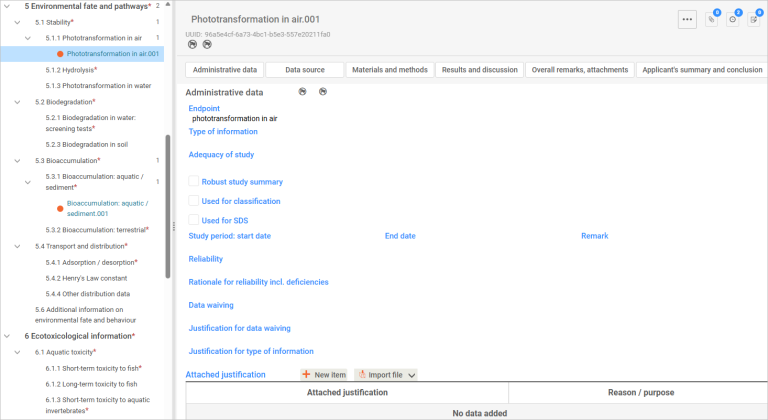
Administrative data
Use the Administrative data section to manage confidentiality, regulatory use and study context.
- You can flag CBI and restrict regulatory use (by jurisdiction).
- Flagging through Administrative data automatically flags the whole section.
- You can enter data into an endpoint study record through both structured (e.g., pick list and repeatable tables) and unstructured (e.g., plain and free text) fields.
Some fields appear or disappear depending on your earlier selections.
For example, if you selected Experimental study under Type of information, the option to waive data will not be available.
If you selected an incorrect state or form for a substance (for example, for a nanoform), nanoform-related fields may not appear.
Key Administrative data fields
Endpoint – select the type of endpoint from a pick list. If there is only one type, the name of the endpoint record is the only choice. Provide any comments about the endpoint under Remarks, if needed.
Types of information – your selection determines which fields appear for you to complete.
Adequacy of study – select the description of how the endpoint study meets the information requirements from the pick list (see table below) for the chemical under your assessment certificate application.
| Study type | Explanation |
|---|---|
| Key study | A study that is relevant, adequate, and reliable. We expect that they will relate to a robust study summary included with the certificate application. If there is more than one key study, then use the study with the highest hazard profile. Make sure you also describe reasons why you chose the study as the key study. Include this in the Justification for type of information field. |
| Supporting study | A study that provides extra information supporting the conclusions of the key study. |
| Weight of evidence | Select this option where your submission relies on multiple studies for the same endpoint. This approach suggests that there is no single relevant, adequate, or reliable study available to reach a conclusion and that multiple studies are needed to make a conclusion about the particular property of the chemical. Include reasons describing why you chose a weight of evidence approach under Justification for type of information. |
| Disregarded due to major methodological deficiencies | Select this option where a study result shows a higher hazard profile than a key study result, but the methodology or documentation is unreliable, inadequate or irrelevant. Include reasons why this study was disregarded under Justification for type of information. |
| Other information | Select this option when information is available for the endpoint, but it does not meet the criteria for classification as disregarded due to methodological deficiencies. |
Use the help text for guidance for other fields under Administrative data.
Data waiving – select the reason for waiving study data. Provide justification under Justification for data waiving.
Justification for type of information – justify the type of information for the endpoint study record. You can select from existing templates for most types of information that is not an experimental study.
Attach justification – you can also attach files for your justification(s) through repeatable tables.
Cross reference – link to related information already stored elsewhere in the dataset so it doesn’t need to be uploaded again.
Select New item to use the repeatable tables. Set the values by filling in the pop-up fields – this allows you to select the stored reference(s).
Data source – this is the literature reference for this endpoint study record.
You can create this through Literature reference under Inventory manager. Or you can create the reference on the page in the pop-up window. Select Create for more than one literature reference.
Data access and Data protection claimed – required information if you are seeking to protect CBI.
Materials and methods
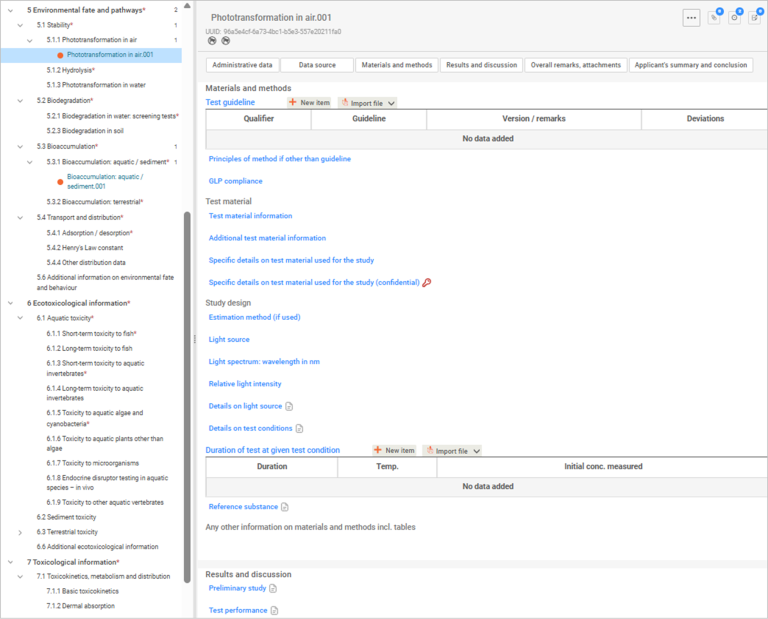
Use the help text to complete all fields. Key fields include:
- Test guideline – This is a critical field as it identifies the methodology used to generate the data. Recording the test guideline allows assessors to evaluate the reliability, comparability, and regulatory acceptability of the study.
- Repeatable tables – use these to include one or more applicable guidelines.
- OECD test guidelines – You will find it easier to fill in documents using studies conducted using OECD test guidelines, as AICIS working contexts follow OECD harmonised templates.
Principles of method if other than guideline – you can use the available templates for QSARs and for a non-guideline study.
You can also indicate GLP compliance as indicated in the study.
Test material information – select the appropriate test material from the pop-up list. You can only select one test material. If you have not yet created the test material reference, select Create.
Specific details on test material used for the study – provide as many details as possible on the test material.
Specific details on test material used for the study (confidential) – details that are confidential are provided in this field.
Fill in all the fields under materials and methods using the help text to guide you.
Any other information on materials and methods including tables – you can include detailed text as well as tables or other structured information where needed.
Results and discussion
Section-specific differences
Section 6 – Ecotoxicological information: Use Effect concentrations to report results.
Section 7 – Toxicological information: Use Effect levels to report results.
Apart from this difference, complete the remaining fields in the same way.
Completing results
Effect concentrations
Flag key results by selecting Key result. Use the templates to provide details on the results (test substance, positive control and negative control).
Reported statistics and error estimates – provide these in the text field.
Sublethal observations / clinical signs – record these observations and include any relevant details.
Overall remarks
This field is optional. Use it to provide more context or clarify study details.
Attachments
You must attach background material under the appropriate table, such as:
- the full study report for experimental data
- for analogue approaches, full articles or reports generated from appropriate computational models (for example, Quantitative Structure-Activity Relationship (QSAR) data).
We do not publish study reports you provide us.
Applicant’s summary and conclusion
You can:
- indicate whether validity criteria in the test guideline were met and explain why under Remarks
- provide conclusions and an executive summary of the results.
Upload a valid IUCLID6 file for your chemical dossier
Use this information to understand what checks you must make before you upload your dossier, and how to submit in AICIS Business Services.
What is a valid IUCLID dossier?
A valid IUCLID dossier must:
- pass all submission checks (no failures)
- have quality warnings addressed or explained
- be exported as .i6z file
- be exported using 'previous major version'
- reflect your final dataset.
A valid IUCLID file is a dossier exported from IUCLID to AICIS Business Services.
Before you export your dossier, you must validate your dataset in IUCLID using the Validation assistant.
How to run validation
1. Open your list of datasets under Substances and select the relevant dataset
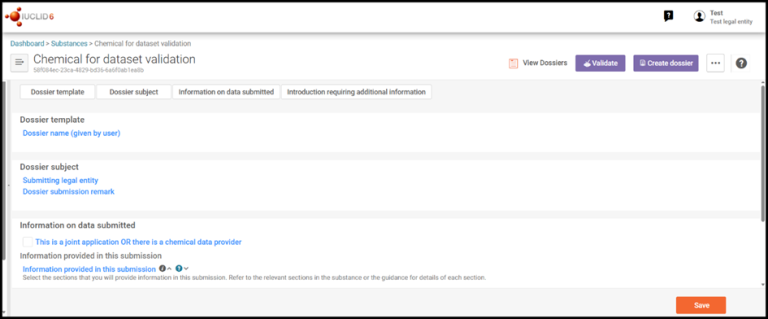
2. Confirm the chemical dataset you wish to validate is open
Check for the correct chemical name.
3. Confirm the AICIS working context matches your application type:
- Comparable hazard assessment
- Environment focus
- Health and environment focus
- Health focus
- Very low to low risk.
Do not select Assessment and evaluation.
4. Select the Validate button
5. Complete the following information:
Dossier name – enter a clearly identifiable dossier name (Example: CA12345 – chemical XX).
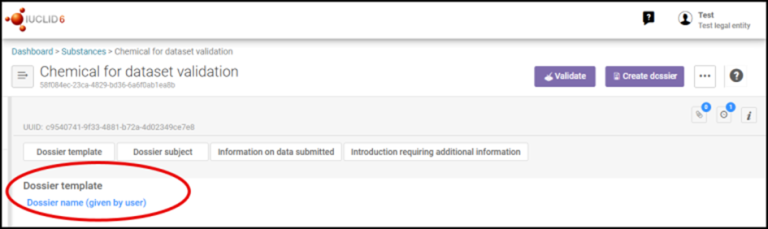
This image shows where you enter the dossier name in IUCLID.
Information on data submitted – Answering the following identifies the applicable rules and protects confidentiality of information.
Select the checkbox if the application is a joint application OR there is a chemical data provider.
If there is, select your role:
- Certificate applicant
- Chemical data provider
Leave blank if not applicable.
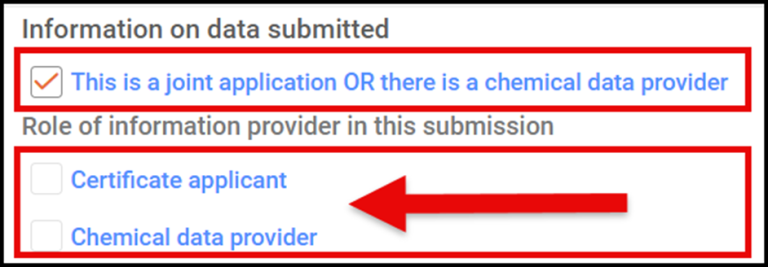
This image is a screenshot showing information you need to select if this is a joint application or if there is a chemical data provider.
Information provided in this submission – select all boxes that apply to the information you are providing:
- Identity, composition and analytical information
- Classification and labelling
- Manufacture, use and exposure
- Physical and chemical properties
- Environmental fate and pathways
- Ecotoxicological and toxicological information
- Guidance on safe use.
Introduction requiring additional information – this relates to introductions of chemicals that are a specified class of introduction.

This image shows where you need to indicate if the introduction is of a chemical that is a specified class of introduction.
Select No class relevant if it is not a specified class of introduction.
If the application is for a specified class of introduction, select the relevant class under Class of introduction.
- biochemicals
- certain chemicals at the nanoscale
- chemicals for end use as biocidal actives
- chemicals for end use in articles that are children's toys or children's care products
- chemicals for end use in articles with food contact
- chemicals for end use in tattoo inks
- designated fluorinated chemicals - refer to the AICIS website for additional information requirements for the assessed chemical and fluorinated degradation products
- chemicals that are intentionally released to the environment during use (designated kind of release into the environment)
- chemicals with an end use in firefighting (designated kind of release into the environment)
- chemicals with an end use offshore (designated kind of release into the environment)
- genetically modified products
- highly branched organic chemicals
- persistent gas
- polyhalogenated organic chemicals
- UV filters.
6. Select Validate to generate report
The Validation assistant report produces 2 types of checks:
- Submission checks – you must fix all errors in this tab. Do not export your dossier until all failures have been fix.
- Quality checks – these checks assess data and quality consistency. Fix quality check warnings where possible or explain them in the relevant fields.

This image is an example of failures and quality checks you need to address after running the Validation assistant report.
7. Repeat validation
After fixing issues re-run the Validation assistant using the re-validate button. Continue to do this until:
- no submission check errors remain
- you have addressed or explained any quality warnings.
8. Final checks before export
Before exporting confirm:
- all required sections completed
- no submission check errors
- identity information is consistent
- data aligns with application type
- CBI included justification
- key studies are explained
- any remaining quality warnings are explained.
9. Export your IUCLID dossier
- Once all validation checks have passed, create your dossier and export it as an .i6z file.
- Select Export to previous major version*
- Save the exported file**
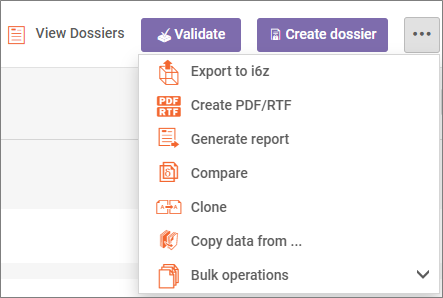
*Exporting your chemical dossier – AICIS uses a specific version of IUCLID to process applications. These versions change over time. Select 'export to previous major version’ when exporting your chemical dossier to reduce delays in processing your application.
**Always export a new dossier after making any changes – Exported files are read-only snapshots of your dataset at the time of export.
10. Upload your dossier to AICIS Business Services
Certificate applicants, chemical data providers and agents can upload dossiers to AICIS Business Services.
How to upload your dossier to AICIS Business Services
- Log into AICIS Business Services.
- Open the assessment certificate application
- Upload your validated .i6z file.
Remember: you must submit applications and declarations in the AICIS Business Services portal, not in IUCLID.
Video on how to validate your chemical dataset in IUCLID
Watch our video tutorial that shows how to validate your chemical dataset in IUCLID for an assessment certificate application.
More manuals and guidance
For more information on using IUCLID, including details on using the IUCLID6 web interface, refer to the IUCLID User Manual on the European Chemicals Agency (ECHA) website. The ECHA website also provides:
- instructions for installing and updating IUCLID 6
- other manuals and guidance materials to help you complete IUCLID forms.
Go to the ECHA IUCLID information hub
You can use these resources alongside this AICIS-specific guide if you need more detailed system-level guidance.
Appendix: How to report read across in IUCLID
Introduction
This appendix explains how to report read across information in IUCLID for an AICIS assessment certificate application.
It focuses on how to enter and structure read across data in IUCLID.
It does not explain:
• when read across is appropriate, or
• how to justify your scientific approach.
You must follow AICIS guidance to determine whether your read across approach is scientifically valid and acceptable.
Before you begin
For an assessment certificate application, you must:
- provide detailed, evidence-based hazard information
- include a scientifically justified read across rationale for each endpoint where it is used
To understand how to apply and justify read across, see:
Once you have established and justified your read across approach, use the guidance below to report it correctly in IUCLID.
What you will do in IUCLID
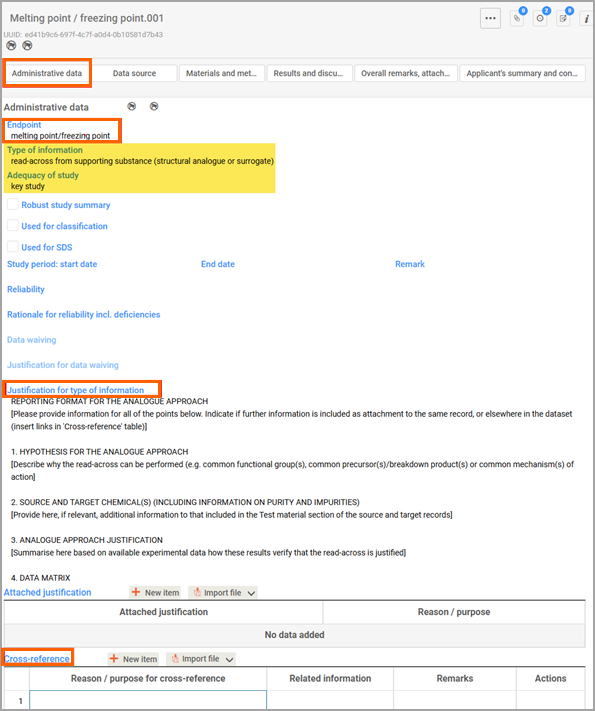
You report read across information in IUCLID in endpoint study records (sections 4–7), using the Administrative data fields such as:
- Type of information
- Adequacy of study
- Justification for type of information.
Read-across reporting in IUCLID6 using the analogue approach
You can report read across in IUCLID using an analogue approach, where data from a similar substance is used to predict properties for your substance:
- the target chemical is the substance you are assessing
- the source chemical is the substance with experimental data
Source record
A source record refers to the source chemical. It is usually an endpoint study record (e.g. acute toxicity oral, skin sensitisation) that has an experimental study as type of information. A source record should be a key study.
When you report a source record for the target chemical for the same endpoint, make sure you can clearly distinguish them. Use descriptive names to identify the record (for example, Skin sensitisation SOURCE, or Skin sensitisation TARGET).
Target record
Your target record contains the read-across outcome from your source substance. For Type of information of a target record, select from the pick list read across from supporting substance (structural analogue or surrogate).
For Adequacy of study, select either key study or weight of evidence.
For Justification for type of information, select Read across (analogue) as justification template and fill it in.
Cross-referencing to a source record
You can link your target record to a reference substance (that has the source data) under Cross-reference by selecting New item.
Select Read-across source as the reason or purpose for the cross-reference. Select the source record (pick list) under Related information.
Materials and methods
Though you are reporting on a target record which has no experimental data (you can ignore the queries relating to the test), you still need to provide information on your substance. Test material information is not information on the source record (the substance tested) but on your substance. Click Select and search your test material under Select test material. If you cannot find it, click Create.
Results and discussion
Report the read-across results for the target substance (derived from the source substance).
Summary and conclusion
Report on the outcome of the read-across prediction on the target substance.
Read-across reporting in IUCLID using the category approach.
You need to use both Substances and Categories entities in IUCLID6 to use the read-across approach for a category group (grouped chemicals). You create source and target records for a category group in Substances.
Creating a category
Create a category entity from the IUCLID dashboard:
- select Categories
- select New category
- enter a clear and descriptive name for the category
- Link this category to your business (legal entity).
A new category has no members. To add members:
- select Category members
- select Substance from the pick list
- add both target and source substances to build your category.
Select from Category documents the endpoints you want to read across and save. Use the available template to complete justifications and discussions. You can also provide more information as attachments in Reports.
Save the category after completing these steps.
You can access the chemicals in the category individually through the Substances section. You will be able to see the other members of a category of a chemical under Linked categories at the bottom of the table of contents.
Source record
A source record is usually an endpoint study record (for example, acute toxicity oral, skin sensitisation) that has an experimental study as type of information. A source record should be a key study. In the category approach for read across, a source record can be from any of the category members.
Target record
Your target record contains the read-across outcome for the category members or chemical group.
For your endpoint study record (for example, skin sensitisation), select:
- Type of information to read-across based on grouping of substances (category approach)
- Key study or weight of evidence for Adequacy of study.
Use the template to provide justification for type of information.
Materials and methods
You can provide information on the test material (the target chemical, not the source chemical) under Test material information.
Results and discussion
You can only report the results from the source endpoint record that are relevant to the category grouping. Do not include the results from the source record that you are not using in read across (target record) for the category grouping.
Summary and conclusion
Here you can provide the main conclusions and justification of the category approach for this chemical group.
Appendix: Information waivers for assessment certificate applications
This guidance helps anyone planning to submit an assessment certificate application in understanding when it is appropriate to request an information waiver and justifications that we would accept.
What are information waivers?
Information waiving refers to omitting certain required information about the chemical in a certificate application.
When applying for an assessment certificate, you need to provide information on the:
- physical and chemical properties
- environment-related endpoints
- human health-related endpoints
of the chemical you wish to introduce.
We need this information for risk assessment of your chemical. The type of information you’ll need to give us depends on your application type. If requesting an information waiver on certain properties or endpoints, you will need to provide a reason or justification for not submitting the required information about your chemical. You can choose a justification from the lists below (see 'Information waiver justifications in IUCLID6' and 'Information justifications not in IUCLID6' below). Alternatively, you can provide your own justification.
Please note for specified class of introductions, the information requirements may override the information waivers in this guidance.
When we assess an application, we will consider all available information from:
- in vitro tests
- in vivo tests
- human evidence/studies
- data from suitable analogues
- valid Quantitative Structure-Activity Relationship (QSAR) data on a case-by-case basis.
Any information you provide must also comply with our policy on animal test data.
We recommend that you first search for any existing information before looking to commission a study.
How to request an information waiver
You can request an information waiver in the certificate application form or in IUCLID6.
Information waiver justifications in IUCLID6
IUCLID has built-in information waiver and justification options you can choose when applying. Your information waiver options include:
- Study technically not feasible
- Study scientifically not necessary / other information available
- Exposure considerations
- Study waived due to provisions of other regulation
- Other justification.
If the first 4 options do not apply, you can choose the “Other justification” option. This will allow you to type in your own justification. We may request further information from you if required.
See the most used information waivers for each endpoint, and their built-in justifications from IUCLID6 below. To ensure we align with international best practise, we have adopted many of the information waiver justifications a number of OECD member countries use.
Click here to skip this list and go to information waivers justifications not in IUCLID6.
We update both information waiver lists on this page from time-to-time. Make sure you check you are using the latest version of this guidance each time you request an information waiver.
IUCLID6 information waivers for physical and chemical properties
Study technically not feasible
- the study does not need to be conducted for explosives
- the study does not need to be conducted for self-reactive substances
- the study does not need to be conducted because chemical change occurred during the melting point study
Study scientifically not necessary / other information available
- the study does not need to be conducted because the substance is a gas and the transition from liquid to gas, if any, does not occur close to 20°C
- the study does not need to be conducted because the substance is a solid which melts above 300°C
- the study does not need to be conducted because the substance is a solid which decomposes before boiling
Study scientifically not necessary / other information available
- the study does not need to be conducted because the substance is only stable in solution in a particular solvent and the solution density is similar to that of the solvent
Study scientifically not necessary / other information available
- the study does not need to be conducted because the substance is marketed or used in a non solid or granular form
Study technically not feasible
- vapour pressure testing is not required because the standard boiling point is less than 30ºC, as this substance will have a vapour pressure value above the limit of measurement (i.e. 10E+05 Pa)
- the study does not need to be conducted for explosives
- the study does not need to be conducted because the substance is self-reactive
- the study does not need to be conducted for organic peroxides
Study scientifically not necessary / other information available
- the study does not need to be conducted because the melting point is above 300°C
Study technically not feasible
- the study does not need to be conducted because the substance is inorganic
- the study does not need to be conducted because the substance decomposes
- the study does not need to be conducted because the substance has a high surface activity
- the study does not need to be conducted because the substance reacts violently during the performance of the test
- the study does not need to be conducted because the substance does not dissolve in water or in octanol
Study scientifically not necessary / other information available
- the study does not need to be conducted because the substance is hydrolytically unstable at pH 4, 7 and 9 (half-life less than 12 hours)
- the study does not need to be conducted because the substance is readily oxidisable in water
Study technically not feasible
- the study does not need to be conducted because the substance is a gas
- the study does not need to be conducted because the substance is an aerosol
- the study does not need to be conducted because the substance is inorganic
- the study does not need to be conducted because the substance is an inorganic liquid with no covalent bonds
- the study does not need to be conducted because the flash point is only relevant to liquids and low melting point solids
- the study does not need to be conducted because the substance only contains volatile organic components with flash-points above 100°C for aqueous solutions
- the study does not need to be conducted for explosives
- the study does not need to be conducted because the substance is pyrophoric
- the study does not need to be conducted because decomposition occurred during the melting point study
- the study does not need to be conducted because some impurities have an impact on the ignition source in such a way as to distort/invalidate the results
Study scientifically not necessary / other information available
- the study does not need to be conducted because the flash point for liquid organic peroxides is only relevant in the temperature range where the product is thermally stable. Above the SADT (self-accelerating decomposition temperature) of the product flash point determination is not relevant because decomposition products are evolved
- the study does not need to be conducted because the flash point for liquid self-reactive substances is only relevant in the temperature range where the product is thermally stable. Above the SADT (self-accelerating decomposition temperature) of the product flash point determination is not relevant because decomposition products are evolved
Study technically not feasible
- the study does not need to be conducted for explosives
- the study does not need to be conducted because the substance is pyrophoric
- the study does not need to be conducted for liquid organic peroxides, because the vapours decompose during the execution of the test
- the study does not need to be conducted for liquid self-reactive substances, because the vapours decompose during the execution of the test
Study scientifically not necessary / other information available
- the study does not need to be conducted because the substance is a liquid non-flammable in air, e.g. no flash point up to 200°C
- the study does not need to be conducted because the substance is a gas having no flammable range
- the study does not need to be conducted because the substance is a solid having a melting point less than or equal to 160°C
Study technically not feasible
- the study does not need to be conducted for explosives
- the study does not need to be conducted because the substance is pyrophoric
- the study does not need to be conducted for organic peroxides
- the study does not need to be conducted for self-reactive substances
- the study does not need to be conducted because the substance is a solid
- the study does not need to be conducted because the substance is a liquid
- the study does not need to be conducted because the substance is no aerosol
- the study does not need to be conducted for self-reactive substances / mixtures
- the study does not need to be conducted because the substance is a gas
Study scientifically not necessary / other information available
- the study does not need to be conducted because the substance is a gas and the concentration of the flammable gas in a mixture with inert gases is so low that, when mixed with air, the concentration is all time below the lower limit.
- the study does not need to be conducted because the substance is known to be stable in contact with air at room temperature for prolonged periods of time (days) and hence, the classification procedure does not need to be applied
- the study does not need to be conducted because the substance is completely molten at 160°C
- the study does not need to be conducted because the substance undergoes exothermic decomposition at a temperature below or equal to 140°C
- the study does not need to be conducted because the organic substance does not contain metals or metalloids and hence, the classification procedure does not need to be applied
- the study does not need to be conducted because the experience in production or handling shows that the substance does not react with water, e.g. the substance is manufactured with water or washed with water
- the study does not need to be conducted because the substance is known to be soluble in water to form a stable mixture
Other justification
- the study does not need to be conducted because the substance is an aerosol and aerosols shall not be classified as flammable gases
- the study does not need to be conducted because the aerosol is not submitted to the flammability classification procedures, but is classified as 'extremely flammable' (Aerosol, Category 1)
Study technically not feasible
- the study does not need to be conducted because the substance is a gas
Study scientifically not necessary / other information available
- the study does not need to be conducted because there are no chemical groups present in the molecule which are associated with explosive properties
- the study does not need to be conducted because the substance contains chemical groups associated with explosive properties which include oxygen, but the calculated oxygen balance is less than - 200
- the study does not need to be conducted because the substance is an organic substance or mixture containing chemical groups associated with explosive properties, but the exothermic decomposition energy is less than 500 J/g and the onset of exothermic decomposition is below 500°C
Study technically not feasible
- the study does not need to be conducted for explosives
- the study does not need to be conducted for flammable aerosols
- the study does not need to be conducted for organic peroxides
- the study does not need to be conducted because the substance is a solid
- the study does not need to be conducted because the substance is a liquid
- the study does not need to be conducted because the substance is a gas
Study scientifically not necessary / other information available
- the study does not need to be conducted for flammable gases
- the study does not need to be conducted because there are no chemical groups present in the molecule which are associated with oxidising properties and hence, the classification procedure does not need to be applied
- the study does not need to be conducted because the substance is pyrophoric
- the study does not need to be conducted because the organic substance does not contain oxygen or halogen atoms and hence, the classification procedure does not need to be applied
- the study does not need to be conducted because the organic substance contains oxygen or halogen atoms which are chemically bonded only to carbon or hydrogen and hence, the classification procedure does not need to be applied
- the study does not need to be conducted because the inorganic substance does not contain any oxygen or halogen atoms and hence, the classification procedure does not need to be applied
- the study does not need to be conducted because the substance is incapable of reacting exothermically with combustible materials
- the study does not need to be conducted because the substance is flammable
Study technically not feasible
- the study does not need to be conducted because the analytical method is not sensitive enough
- the study does not need to be conducted because the substance has no ionic structure
- the study does not need to be conducted because the substance is insoluble
Study scientifically not necessary / other information available
- the study does not need to be conducted because the substance is hydrolytically unstable (half-life less than 12 hours)
- the study does not need to be conducted because the substance is readily oxidisable in water
Study technically not feasible
- the study does not need to be conducted because the substance is highly insoluble in water
Study scientifically not necessary / other information available
- the study does not need to be conducted because the substance is readily biodegradable
Study scientifically not necessary / other information available
- the study does not need to be conducted because the substance has a low octanol water partition coefficient and the adsorption potential of this substance is related to this parameter
- the study does not need to be conducted because the physicochemical properties of the substance indicate that it can be expected to have a low potential for adsorption
- the study does not need to be conducted because the substance and its relevant degradation products decompose rapidly
IUCLID6 information waivers for environment related endpoints
Study technically not feasible
- the study does not need to be conducted because the substance is inorganic
Study scientifically not necessary / other information available
- the study does not need to be conducted because the substance has a low potential to cross biological membranes
Exposure consideration
- the study does not need to be conducted because direct and indirect exposure of the aquatic compartment to the substance is unlikely
Study scientifically not necessary / other information available
- the study does not need to be conducted because the substance is highly insoluble in water, hence indicating that aquatic toxicity is unlikely to occur
- the study does not need to be conducted because the substance is unlikely to cross biological membranes, hence indicating that aquatic toxicity is unlikely to occur
- the study does not need to be conducted because a long-term aquatic toxicity study on fish is available
Study scientifically not necessary / other information available
- the study does not need to be conducted because the substance is highly insoluble in water, hence indicating that aquatic toxicity is unlikely to occur
- the study does not need to be conducted because the substance is unlikely to cross biological membranes, hence indicating that aquatic toxicity is unlikely to occur
- the study does not need to be conducted because a long-term aquatic toxicity study on invertebrates is available
IUCLID6 information waivers for human health related endpoints
Study scientifically not necessary / other information available
- the study does not need to be conducted because the substance is classified as corrosive to the skin
Study scientifically not necessary / other information available
- the study does not need to be conducted because the substance is classified as corrosive to the skin
Study scientifically not necessary / other information available
- the study does not need to be conducted because the substance is classified as corrosive to the skin
- the study does not need to be conducted because the physicochemical and toxicological properties suggest no potential for a significant rate of absorption through the skin
Exposure considerations; study scientifically not necessary / other information available
- the study does not need to be conducted because skin contact in production and/or use is not likely
Study technically not feasible
- the study does not need to be conducted because the substance is spontaneously flammable in air or in contact with water or moisture at room temperature
Study scientifically not necessary / other information available
- the study does not need to be conducted because the substance is classified as acute toxicity by the dermal route (Category 1)
- the study does not need to be conducted because an acute toxicity study by the dermal route does not indicate skin irritation up to the relevant limit dose level (2 000 mg/kg body weight)
- the study does not need to be conducted because the substance is a strong acid (pH less than or equal to 2.0) or base (pH equal to or greater than 11.5) and the available information indicates that it should be classified as skin corrosion (Category 1, 1A, 1B or 1C)
Study technically not feasible
- the study does not need to be conducted because the substance is spontaneously flammable in air or in contact with water or moisture at room temperature
Study scientifically not necessary / other information available
- the study does not need to be conducted because the substance is classified as skin irritation and the available information indicates that it should be classified as eye irritation (Category 2)
- the study does not need to be conducted because the substance is a strong acid (pH less than or equal to 2.0) or base (pH equal to or greater than 11.5) and the available information indicates that it should be classified as serious eye damage (Category 1)
Study technically not feasible
- the study does not need to be conducted because the substance is spontaneously flammable in air or in contact with water or moisture at room temperature
Study scientifically not necessary / other information available
- an in vitro cytogenicity study in mammalian cells or in vitro micronucleus study does not need to be conducted because adequate data from an in vivo cytogenicity test are available
- an in vitro cytogenicity study in mammalian cells or in vitro micronucleus study does not need to be conducted because the substance is known to be carcinogenic category 1A or 1B or germ cell mutagenic category 1A, 1B or 2
- an in vitro gene mutation study in mammalian cells does not need to be conducted because adequate data from a reliable in vivo mammalian gene mutation test are available
- an in vitro gene mutation study in mammalian cells does not need to be conducted because a positive result was found in in vitro cytogenicity study in mammalian cells
- an in vitro gene mutation study in mammalian cells does not need to be conducted because a positive result was found in in vitro micronucleus study
Information waiver justifications not in IUCLID6
Where the justification you wish to use is not in IUCLID6, you can also check our 'Information waiver justifications not in IUCLID6' list. You can use one of the justifications on this list for us to consider in your certificate application.
For information waiver justifications not included in IUCLID6, choose the “Other justification” option and input the justification in the free text box.
We will also consider justifications that are not in our list or built into IUCLID. We may request further information if required.
Check the following:
A waiver can be applied for if your chemical:
Melting point / freezing point
- is a salt that is only stable as an aqueous solution
- has a melting point/freezing point less than or equal to -25 °C or greater than 300 °C
- undergoes a chemical reaction or decomposes. In this case, the temperature of the chemical reaction/decomposition point must be provided
- has a pour point or softening point, which is more applicable to be provided
- is a gas at room temperature and pressure
- is a PLC or low concern biopolymer
Boiling point
- is a salt that is only stable as an aqueous solution
- has a sublimation point, which is more applicable to be provided
- is a PLC or low concern biopolymer
Density
- is a gas. In this case, an estimation based on its molecular weight and the Ideal Gas Laws must be provided
- is a PLC or low concern biopolymer
Vapour pressure
- has a melting point between 200 °C and 300 °C. In this case, a limit value based on measurement or a recognised calculation method must be provided
- has a molecular weight greater than 1,000 g/mol.
- is an ionic solid
- is a PLC or low concern biopolymer
Partition coefficient
- is hydrolytically unstable (t½ less than 12 hours)
- is expected to have log Kow greater than 7
- has a water solubility greater than 5 g/L
- is a PLC or low concern biopolymer
Water solubility
- is produced in an aqueous solution and is not available in an isolated form
- is surface active and forms a stable emulsion in water, which cannot be separated by filtration or centrifugation methods
Flash point
- has an estimated flashpoint greater than 200 °C
- has a flashpoint that can be accurately predicted by interpolation from existing characterised material
- will be introduced at a volume less than 1000 kg per year
Auto flammability
- will be introduced at a volume less than 1000 kg per year
Flammability
- will be introduced at a volume less than 1000 kg per year
Explosiveness
- will be introduced at a volume less than 1000 kg per year
Oxidising properties
- the preliminary test indicates the chemical has oxidising properties (i.e. full test does not need to be conducted)
- will be introduced at a volume less than 1000 kg per year
Hydrolysis as a function of pH
- is readily reactive in the presence of water or moisture
- is a PLC or low concern biopolymer
Adsorption/desorption
- is hydrolytically unstable (t½ less than 12 hours)
- has a water solubility of less than 0.01 mg/L or the water solubility cannot be measured analytically
- is an inorganic compound
- is a gas at room temperature and pressure
- is a high molecular weight polymer
- is a PLC or low concern biopolymer
AICIS will not require information if your chemical:
Persistence
- is inorganic
- is a biological chemical
Bioaccumulation
- has a molecular weight greater than 1000g/mol
- is a high molecular weight polymer with
- less than 25% low molecular weight oligomeric species less than 1000g/mol
- less than 10% low molecular weight oligomeric species less than 500g/mol
- is an inorganic chemical
- is a gas that is not expected to partition to the aquatic compartment
- has a solubility in water that is greater than 5 g/L, measured following an acceptable test guideline for water solubility
- has a low potential for bioaccumulation based on log Kow less than 4.2 and a low potential to cross biological membranes
- has a low potential for bioaccumulation based on log Kow less than 4.2
Aquatic toxicity
- has a molecular weight greater than 1000 g/mol and has a low cationic density
- is a high molecular weight polymer that has a low cationic density
- is a non-toxic, non-reactive gas that is not expected to partition to the aquatic compartment
- is a substance covered by Entry 9 of Annex V of the REACH regulation
AICIS will not require information if your chemical:
Acute toxicity*
- is severely irritating to the skin (GHS Category 1) or likely to be corrosive to the skin i.e. the chemical is a strong acid (pH less than or equal to 2.0) or base (pH equal to or greater than 11.5), together with high buffering capacity (if relevant)
- is spontaneously flammable in air or in contact with water or moisture at room temperature
- is a high molecular weight polymer that has less than 5% by mass of molecules with molecular weight less than 1000 g/mol, or less than 2% by mass of molecules with molecular weight less than 500 g/mol
- if a NOAEL equal to or greater than 1000 mg/kg bw/day was demonstrated in an oral subacute toxicity study on your chemical or from suitable read-across information**
* Information required on either acute oral, dermal or inhalation toxicity
** Acute dermal or acute inhalation toxicity only
Skin corrosion/irritation
- is a strong acid (pH less than or equal to 2.0) or base (pH equal to or greater than 11.5), together with high buffering capacity (if relevant)
- is spontaneously flammable in air or in contact with water or moisture at room temperature
- is acutely toxic via the dermal route (GHS Category 1)
- is not irritating to the skin in a study conducted following OECD test guidelines 402 or draft 434 results, when tested at 2,000 mg/kg bw
Eye damage/irritation
- is a strong acid (pH less than or equal to 2.0) or base (pH equal to or greater than 11.5), together with high buffering capacity (if relevant)
- is spontaneously flammable in air or in contact with water or moisture at room temperature
Skin sensitisation
- is a high molecular weight polymer that:
- contains only low concern functional groups, or
- the only high concern functional groups are unsubstituted positions ortho and para to phenolic hydroxyl groups, or
- has a combined functional group equivalent weight of equal to or greater than 1000 g/mol, or
- is spontaneously flammable in air or in contact with water or moisture at room temperature.
- exposure considerations – workplace use only; not used for consumer applications
Repeat dose toxicity
- is corrosive or severely irritating to the skin (GHS Category 1) or likely to be corrosive to the skin i.e. the chemical is a strong acid (pH less than or equal to 2.0) or base (pH equal to or greater than 11.5), together with high buffering capacity (if relevant), or
- is spontaneously flammable in air or in contact with water or moisture at room temperature, or
- is a high molecular weight polymer, or
- is included in the GRAS for FDA Inventory Notice (GRAS Substances (SCOGS)) Database as a Type 1 Conclusion, unless the GRAS conclusion does not apply to the exposures expected from the industrial use of the chemical.
Genetic toxicity
- is included in the GRAS for FDA Inventory Notice (GRAS Substances (SCOGS)) Database as a Type 1 Conclusion, unless the GRAS conclusion does not apply to the exposures expected from the industrial use of the chemical. or
- is a high molecular weight polymer
- is spontaneously flammable in air or in contact with water or moisture at room temperature.