AICIS Business Services and all searchable databases, including Inventory and assessments, will be unavailable at 6–11pm (AEST) on Friday 19 June.

The manufacturing information you enter in IUCLID Section 3 is generally the same for all certificate application types

See Types of assessment applications and information required in the Guide to applying for an assessment certificate for a summary of information required for this section.

Get started with Section 3

In this section, you must describe how your substance is manufactured, supplied and used, and identify where exposure to people and the environment may occur.

We recommend you first map the process (lifecycle) of the substance (for example, using a simple diagram) to understand how the substance is manufactured, handled and used.

Exposure scenarios (use descriptions)

In IUCLID, exposure scenarios are also called 'identified uses' or 'use descriptions'.

Assign exposure scenarios (use descriptions) for each stage of the substance’s lifecycle, including:

  • manufacture
  • formulation or re-packing
  • uses at industrial sites
  • widespread uses by professional workers
  • consumer uses.

Although manufacture is not a ‘use’, you must still describe it as part of the substance's lifecycle.

Volume allocation

You must allocate the total annual quantity of the substance across lifecycle stages and use scenarios (for example, manufacture, formulation and end use).

  • Enter the total annual tonnage provided in Section 3.2 Estimated quantities.
  • In sections 3.5.1 to 3.5.5, enter only the portion relevant to each activity or use.

The total across all activities and uses must match your Section 3.2 estimates.

Common fields across Section 3

The following fields appear in most Section 3 documents:

  • Tonnage of substance for this use
  • Details on tonnage reported
  • Number of workers using the substance
  • Contributing activities (environment and workers)
  • Use takes place under rigorously contained conditions.

Complete these fields consistently across all relevant sections.

Reporting tonnage across Section 3

You must report annual tonnage in Section 3.2 and allocate this across activities and uses in sections 3.5.1 to 3.5.5. The totals across all uses must match your Section 3.2 estimates.
Naming and describing activities

  • Use clear, descriptive names that distinguish each activity or use.
  • Avoid generic names such as Activity 1.
  • Provide a detailed technical description of each process or use.

General tips for Section 3

  • Use Remarks to provide additional context (for example, assumptions or estimates).
  • Link existing data (sites, compositions, entities) where possible.
  • Flag CBI only where appropriate and provide justification.
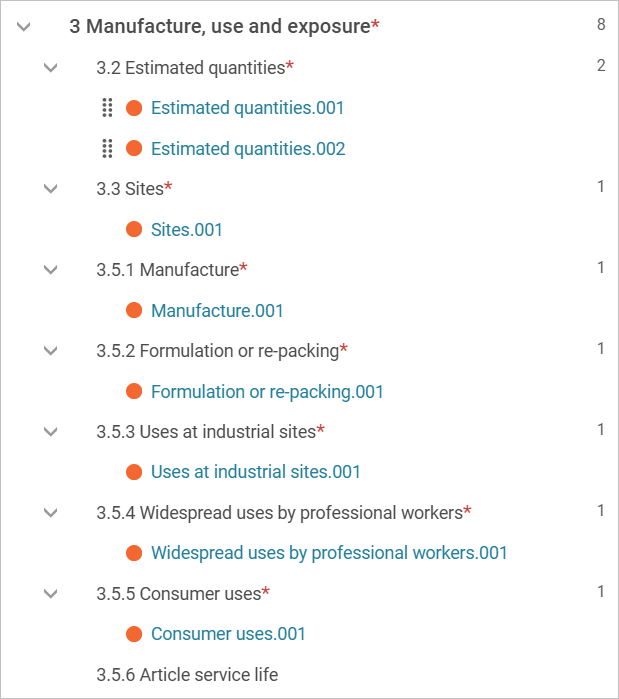
This image is a screenshot of the IUCLID navigation menu showing documents under Section 3, Manufacture, use and exposure.

3.2 – Estimated quantities

In this section, you must report the total annual quantity of your substance for each year of the 5-year certificate period.

To report quantities:

  • Create 5 documents (one for estimated quantities for each of the 5 years of the certificate). Select the plus button (+) to create each document.
  • Enter the total annual tonnage (manufacture and import combined) for each year:
    • Estimated quantities.001 (first year)
    • Estimated quantities.002 (second year)
    • Estimated quantities.003 (third year)
    • Estimated quantities.004 (fourth year)
    • Estimated quantities.005 (fifth year).

You can flag CBI and restrict regulatory use (by jurisdiction).

Use Remarks to provide any extra information. For example, details of flagged CBI. Be specific on which tonnage you wish to flag (import, manufacture or both). Also provide:
  • justification for flagging the specific tonnage
  • the tonnage value you want published (the non-CBI value).
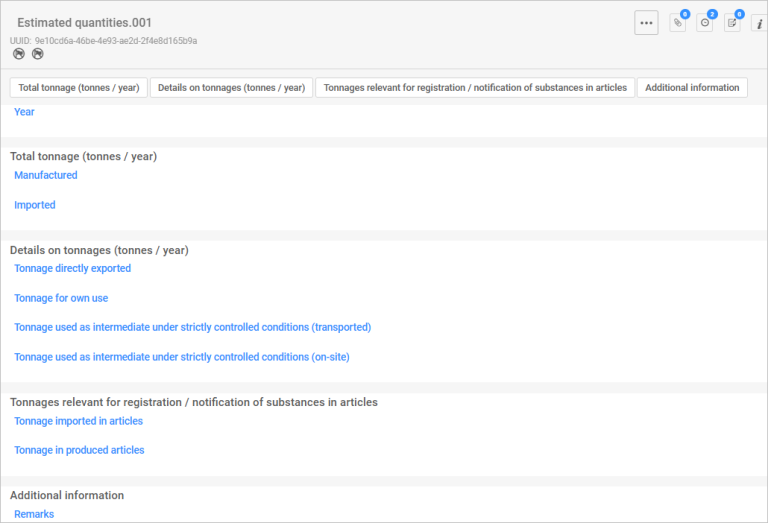
This image is a screenshot of the estimated quantities screen in IUCLID.

3.3 – Sites

In this section, you must add the sites where activities will take place and link them to the relevant uses.

Add and select sites

  • Add all relevant sites (Australia or overseas).
  • Select the plus button (+) and choose from existing sites. If your site is not on the list, select Create to add a new one.
  • For each site, you can flag CBI and restrict regulatory use (by jurisdiction)

Link sites to activities

For each site you have selected or created link to all applicable activities: 
  • Manufacture – Section 3.5.1 Manufacture
  • Formulation – Section 3.5.2 Formulation or re-packing
  • Use at industrial sites – Section 3.5.3 Uses at industrial sites.
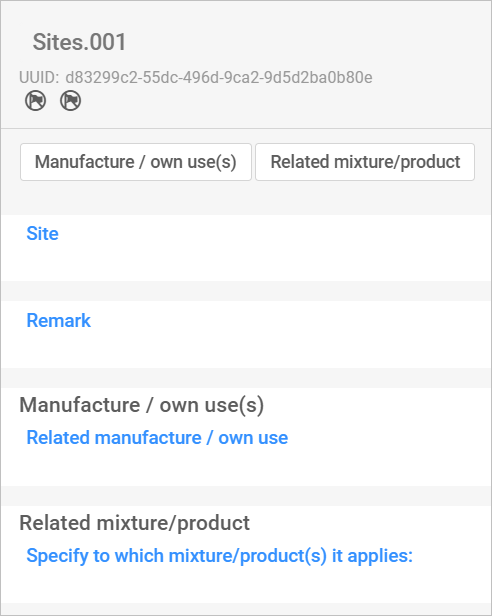
This image is a screenshot of the sites screen in IUCLID.

3.5.1 – Manufacture

In this section, you must describe how the substance is manufactured. 

Create one document per manufacturing activity. 

Key fields

Manufacture name

Use a clear, descriptive name that distinguishes each manufacturing activity from others. 

Further description of the manufacturing process

Provide a detailed technical description of the process. Include relevant operational steps, diagrams, tables, or other structured information, if useful. 

Related composition

You can link a composition created in Section 1.2 Composition, if relevant. 

Tonnage of substance manufactured (tonnes/year)

  • Enter the annual tonnage for the manufacturing activity. Do not enter your total import or manufacture volume (as reported in Section 3.2 Estimated quantities) – only the portion used for this activity.
  • Select Coverage from the pick list or select Other if the value is not listed and enter the relevant information.
  • Use Details on tonnage reported to explain the reported tonnage, including assumptions, estimates or projections. 

Number of workers using the substance for this use 

Enter the number of workers involved in the activity. 

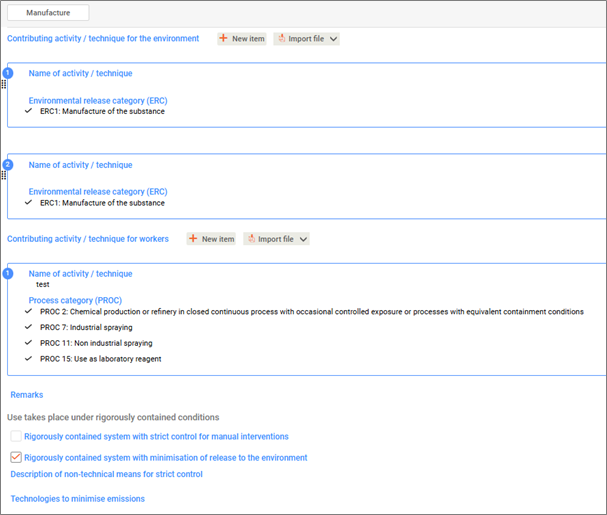
Contributing activity / technique for the environment (ERC)

  • List as many activities and techniques relating to the environment as relevant.
  • Select New item and enter a descriptive name. 
  • Review the Environmental release categories (ERC) carefully and select those that apply. 

Contributing activity / technique for workers (PROC)

  • List as many activities and techniques relating to workers as relevant. 
  • Select New item give a descriptive name.
  • Review the Process categories (PROC) carefully and select those that apply.

Use takes place under rigorously contained conditions 

Select the option that best describes the conditions for this activity or use. Different/additional fields will display depending on your selection.
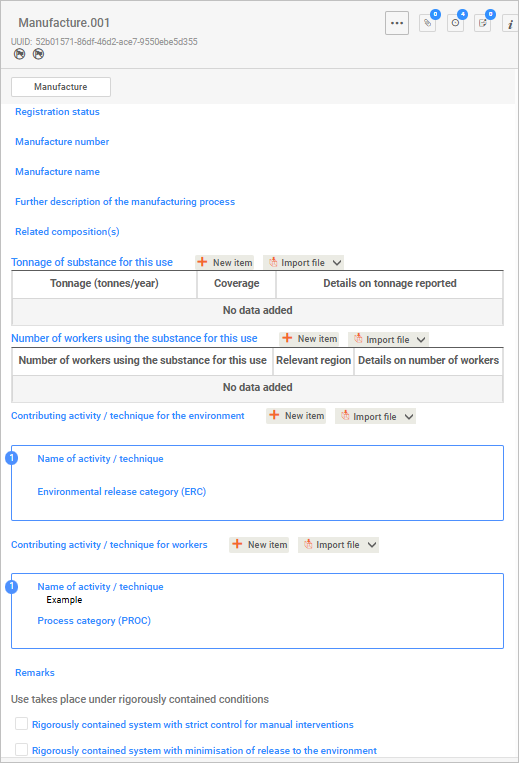
This image is a screenshot of the manufacture screen in IUCLID.
This image is a screenshot of some details filled under the manufacture screen in IUCLID.
This image is a screenshot of some of the details filled under the manufacture screen in IUCLID.

3.5.2 – Formulation or re-packing


3.5.2 – Formulation or re-packing

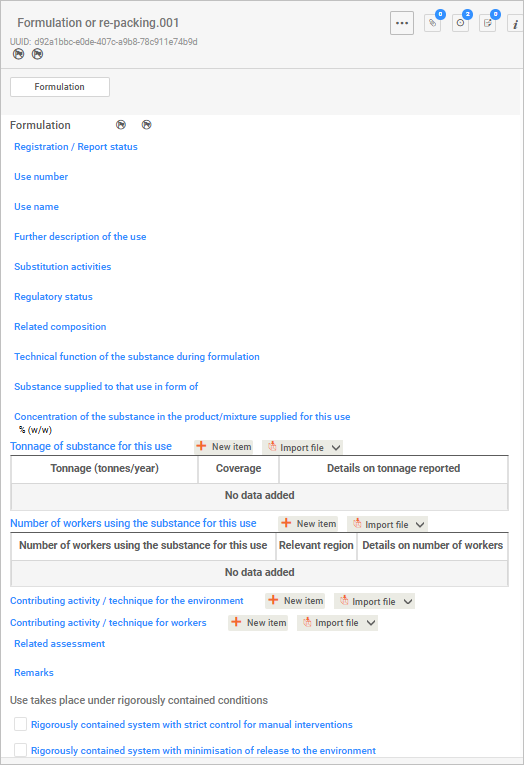
In this section, you will describe how the substance is formulated or re-packed. 

Create one document for each formulation or re-packing activity.

Key fields

For each formulation, you can flag CBI and restrict regulatory use (by jurisdiction).

Use name 

Use a clear and descriptive name that distinguishes one use from another. 

Further description of the use 

Provide a detailed technical description. Include relevant operational steps, diagrams, tables, or other structured information, if useful. 

Related composition 

You can link a composition created in Section 1.2 Composition, if relevant.

Technical function of the substance during formulation 

Select what the substance does from the pick list (select all that applies).

Concentration of the substance in the product/mixture supplied for this use

Enter the approximate highest concentration of the substance for this use. If the substance is used on its own, report 100%, even it is diluted during use.

Tonnage of substance formulated or re-packed (tonnes/year)

  • Enter the annual tonnage for the formulation or re-packing activity. Do not enter your total import or manufacture volume (as reported in Section 3.2 Estimated quantities) – only the portion used for this activity.
  • Select Coverage from the pick list or select Other if the value is not listed and enter the relevant information.
  • Use Details on tonnage reported to explain the reported tonnage, including assumptions, estimates or projections.

Number of workers using the substance for this use 

Enter the number of workers involved in the activity.  

Other fields

  • Contributing activity / technique (environment and workers).
  • Use takes place under rigorously contained conditions.

See Section 3.5.1 Manufacture for guidance on these fields.

This image is a screenshot of the formulation or re-packing screen in IUCLID.

3.5.3 – Uses at industrial sites


3.5.3 – Uses at industrial sites

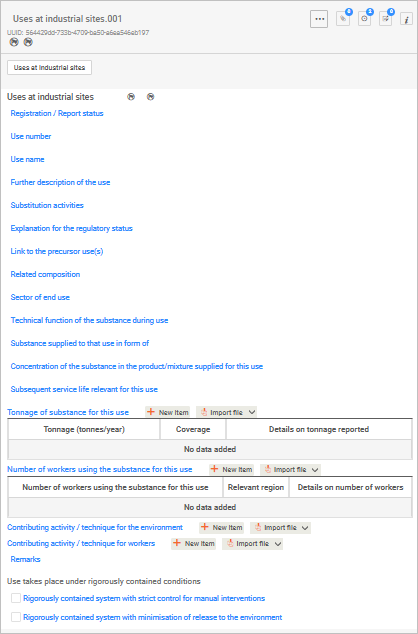
In this section you must describe how the substance is used at industrial sites. Create a document for each type of use. 

The fields in this section are consistent with those in Section 3.5.2 Formulation or re-packing

Complete all common fields in the same way, including: 

  • use name
  • further description of the use
  • related composition
  • technical descriptions
  • concentration of the substance in the product/mixture supplied for this use
  • tonnage of substance for this use
  • number of workers using the substance using the substance for this use
  • other fields. 

We describe additional fields specific to industrial uses below.

For each use at an industrial site, you can flag CBI and restrict regulatory use (by jurisdiction). 

Key fields

Explanation of the regulatory status 

Use this field to elaborate on the international regulatory status. 

Sector of end use and Technical function of the substance during use

Select all relevant sectors from the pick lists (multiple selections allowed).

Select all functions that apply (multiple selections allowed).
This image is a screenshot of the industrial sites screen in IUCLID.

3.5.4 – Widespread uses by professional workers

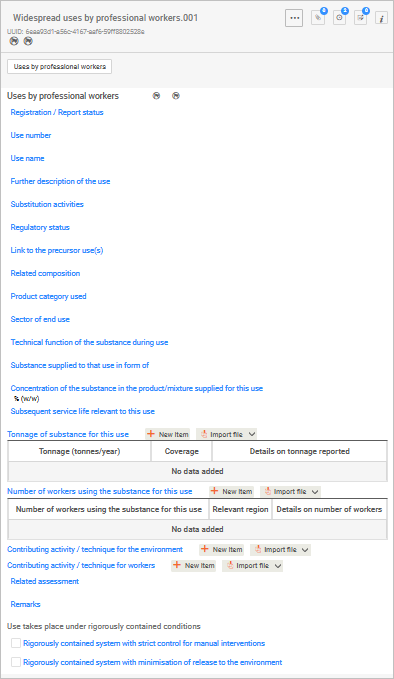
The fields required in this section are the same as those in Section 3.5.3 Uses at industrial sites, adapted for the relevant use type.

This section describes widespread use by professional workers.

Create one document for each type of widespread use.

This image is a screenshot of the widespread uses by professional workers screen in IUCLID.

3.5.5 – Consumer uses

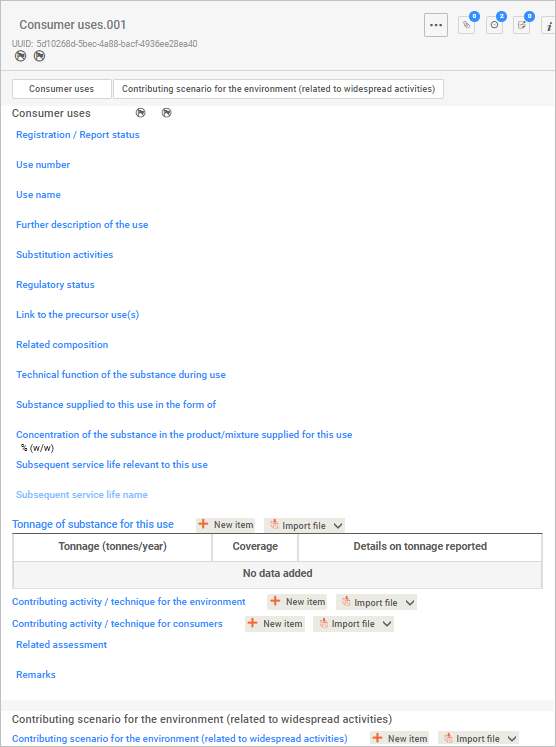
The fields required in this section are the same as those in Section 3.5.2 Formulation or re-packing adapted for the relevant use type.

This section describes consumer uses of the substance. 

Create one document for each type of consumer use.

Key fields

Regulatory status 

Use this field to elaborate on the international regulatory status. 

Technical function of the substance during use

Select all functions that apply (multiple selections allowed).

This image is a screenshot of the consumer uses screen in IUCLID.

ECHA guidance

For detailed guidance on IUCLID fields relating to manufacture, use and exposure, see ECHA's Guidance on information requirements and chemical safety assessment:

The International Fragrance Association (IFRA) also publishes the IFRA REACH Exposure Scenarios for Fragrance Substances.

Was this page helpful?
For broken links or technical issues, please provide as much detail as possible. Do not include your name, email address and other personal or commercially sensitive information.

Sign up to our monthly newsletter