AICIS Business Services and all searchable databases, including Inventory and assessments, will be unavailable at 6–11pm (AEST) on Friday 19 June.

Introduction

IUCLID uses the Substances feature to store information about individual chemicals. 

In regulatory terms, a substance represents a single chemical substance.

IUCLID stores substance datasets under Substances. A substance dataset is a collection of IUCLID documents that together form the chemical dossier for a specific regulatory purpose.

You create and open substance datasets from the Substances section. IUCLID only shows sections and documents after you open a substance dataset.
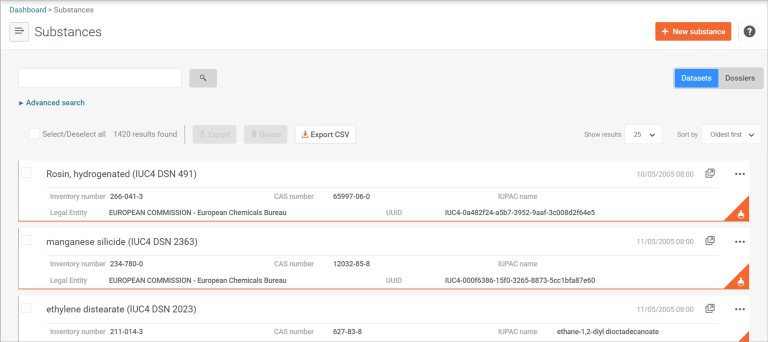
This image is a screenshot of 3 chemical datasets listed in the Substance section of IUCLID.

How do IUCLID substances datasets integrate with AICIS assessment applications?

For AICIS applications, the Substances section is where you create, complete and manage your chemical dossier.

In AICIS terms:

  • A ‘substance dataset’ has the same meaning as the ‘chemical dataset’ for an assessment certificate application.
  • This dataset contains the chemical information AICIS assesses.
  • You must validate everything you prepare in the substance dataset before you export it as your dossier.

Reminder: All substance datasets must be created under an AICIS working context.

The determines which sections, fields and validation rules apply.

If you submit datasets to multiple jurisdictions (for example, AICIS and ECHA), IUCLID allows you to reuse information across different working contexts.

Hints to help you complete a substance dataset

This guidance does not replace the IUCLID user manual. It provides AICIS-specific hints to help you complete IUCLID documents correctly and avoid common issues which cause delays.

When preparing your substance dataset:

  • complete all documents required for your AICIS working context
  • use the table of contents to check for completeness
  • complete all required fields in each document – do not rely on attachments alone, they are not enough
  • use available templates when provided
  • use field-level help text (question-mark icons) for more guidance.

If you use IUCLID for submissions to other regulatory agencies, complete all documents as possible, even if not all fields are mandatory. Doing this helps you meet record-keeping obligations.

Validation assistant

Use the Validation assistant to check that your dataset meets AICIS requirements before you submit it.

Read more about validating your chemical dataset in IUCLID.

This image is a screenshot of the 'Validate' and 'Create dossier' buttons in IUCLID.

This image is a screenshot of the 'Validate' and 'Create dossier' buttons in IUCLID.

Table of contents

Once you open a substance dataset, IUCLID displays a table of contents showing all sections and documents in your dataset. The table of contents:

  • generates based on the AICIS working context you selected
  • shows all required sections and documents for your application type
  • organises information into sections and sub-sections.

Use the table of contents as a guide to identify the documents you need to complete. Note that section numbers do not represent a workflow and do not need to be completed in order.

Was this page helpful?
For broken links or technical issues, please provide as much detail as possible. Do not include your name, email address and other personal or commercially sensitive information.

Sign up to our monthly newsletter