Choose from 5 options:
This appendix explains how to report read across information in IUCLID for an AICIS assessment certificate application.
It focuses on how to enter and structure read across data in IUCLID.
It does not explain:
• when read across is appropriate, or
• how to justify your scientific approach.
You must follow AICIS guidance to determine whether your read across approach is scientifically valid and acceptable.
For an assessment certificate application, you must:
To understand how to apply and justify read across, see:
Once you have established and justified your read across approach, use the guidance below to report it correctly in IUCLID.
You report read across information in IUCLID in endpoint study records (sections 4–7), using the Administrative data fields such as:
You can report read across in IUCLID using an analogue approach, where data from a similar substance is used to predict properties for your substance:
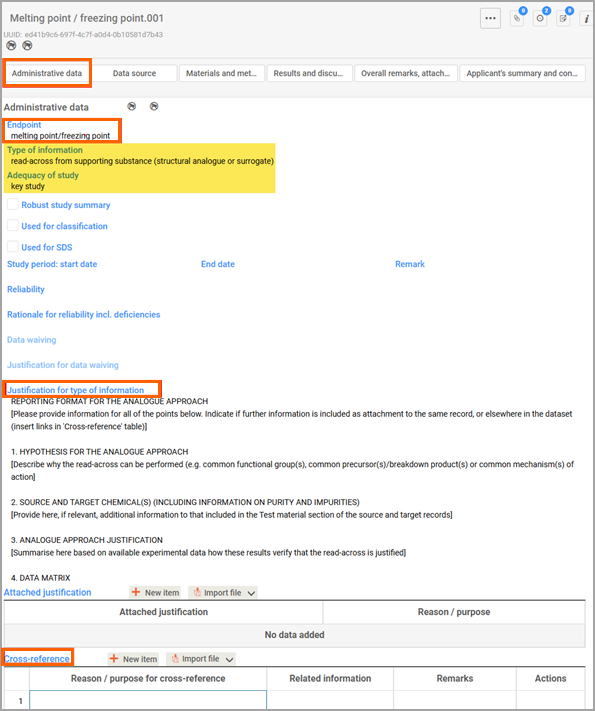
A source record refers to the source chemical. It is usually an endpoint study record (e.g. acute toxicity oral, skin sensitisation) that has an experimental study as type of information. A source record should be a key study.
When you report a source record for the target chemical for the same endpoint, make sure you can clearly distinguish them. Use descriptive names to identify the record (for example, Skin sensitisation SOURCE, or Skin sensitisation TARGET).
Your target record contains the read-across outcome from your source substance. For Type of information of a target record, select from the pick list read across from supporting substance (structural analogue or surrogate).
For Adequacy of study, select either key study or weight of evidence.
For Justification for type of information, select Read across (analogue) as justification template and fill it in.
You can link your target record to a reference substance (that has the source data) under Cross-reference by selecting New item.
Select Read-across source as the reason or purpose for the cross-reference. Select the source record (pick list) under Related information.
Though you are reporting on a target record which has no experimental data (you can ignore the queries relating to the test), you still need to provide information on your substance. Test material information is not information on the source record (the substance tested) but on your substance. Click Select and search your test material under Select test material. If you cannot find it, click Create.
Report the read-across results for the target substance (derived from the source substance).
Report on the outcome of the read-across prediction on the target substance.
You need to use both Substances and Categories entities in IUCLID6 to use the read-across approach for a category group (grouped chemicals). You create source and target records for a category group in Substances.
Create a category entity from the IUCLID dashboard:
A new category has no members. To add members:
Select from Category documents the endpoints you want to read across and save. Use the available template to complete justifications and discussions. You can also provide more information as attachments in Reports.
Save the category after completing these steps.
You can access the chemicals in the category individually through the Substances section. You will be able to see the other members of a category of a chemical under Linked categories at the bottom of the table of contents.
A source record is usually an endpoint study record (for example, acute toxicity oral, skin sensitisation) that has an experimental study as type of information. A source record should be a key study. In the category approach for read across, a source record can be from any of the category members.
Your target record contains the read-across outcome for the category members or chemical group.
For your endpoint study record (for example, skin sensitisation), select:
Use the template to provide justification for type of information.
You can provide information on the test material (the target chemical, not the source chemical) under Test material information.
You can only report the results from the source endpoint record that are relevant to the category grouping. Do not include the results from the source record that you are not using in read across (target record) for the category grouping.
Here you can provide the main conclusions and justification of the category approach for this chemical group.