Choose from 5 options:
Use this section to learn how to create and manage reusable entities in IUCLID, such as legal entities, contacts, sites and reference substances.
Reusable entities allow you to enter information once and reuse it across multiple documents and datasets. Set these up early to reduce duplication and maintain consistency in your application.
Reusable entities are reference data that you can create and store in IUCLID. Once you create them, you can select and link these entities wherever they are required in your dataset.
You can create entities:
The Inventory manager is where you create and manage reusable reference data (such as legal entities, sites and contacts) that your substance dataset will use.
In simple terms, it holds the ‘who, where and what’ information that substance datasets point to.
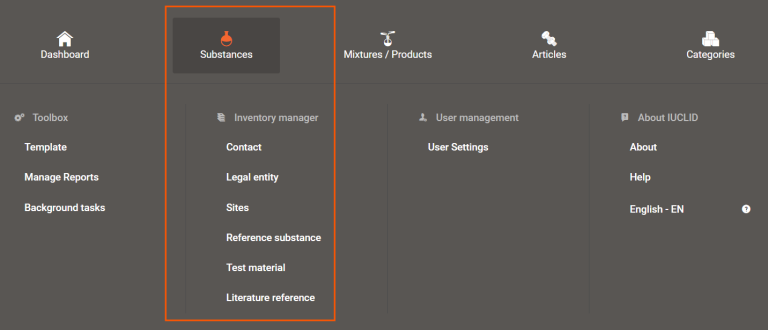
Links to the Inventory manager appear under Substances on the dashboard menu from the IUCLID home page.
The following examples show how the Inventory manager supports data entry in IUCLID:
Example 1 – Sites
You may have several manufacturing sites in Australia, but not all sites manufacture the substance in your application. By creating site entities in the Inventory manager, you can select only the relevant sites when completing your exposure information.
Example 2 – Literature references
Some study reports contain results for multiple endpoints. By creating a literature reference once, you can link it to multiple documents and sections within a substance dataset (for example, across different physical and chemical property endpoints).
The Inventory manager has these entities:
Use contact entities to store details for people involved in the application, such as:
The IUCLID contact type list includes:
For AICIS purposes, select Other and enter the appropriate AICIS contact role (for example, business contact, application contact, agent, chemical data provider).
You can link contact entities in Section 1.1 Identification, under Contact information.
Legal entities represent the businesses involved in the application.
Use to create legal entity entries under Section 1.1 Identification:
You do not need to complete:
For Regulatory program identifiers, select Other for AICIS.
You can link sites under Section 3.3 Sites when completing Manufacture, use and exposure information.
Reference substance stores basic, and relatively constant information about a substance. For example, chemical name and molecular weight.
Test material stores information about variations of the substance, such as purity or concentration.
You can link each reference substance to one or more test materials for reuse across multiple substance datasets.
Literature references store documents and reports that support the information in your dataset.
To create a literature reference, you must:
You can upload attachments such as PDF and DOCX files to a literature reference.
You do not generally submit Inventory manager data on its own. It is included automatically when you link it to a substance dataset.